

Electronics Repair Process at Sim Lim Square: Your Guide
TL;DR:
- Electronics repairs at Sim Lim Square involve free diagnostics, transparent quotes, and advanced techniques like microsoldering. Preparing data backups, documenting issues, and clarifying warranties before visiting ensures a smoother repair process. Post-repair, testing devices immediately and using protective accessories extend their longevity and performance.
Your phone screen just shattered, your laptop won’t charge, or your gaming console refuses to boot. Before you resign yourself to buying a replacement, the electronics repair process at Sim Lim Square offers a practical path forward. Singapore’s premier electronics hub concentrates dozens of specialist repair shops under one roof, covering everything from cracked screens to advanced motherboard-level diagnostics. This guide walks you through every stage of the repair process, from what to do before you leave home to how to care for your device once it’s fixed.
Table of Contents
- Key Takeaways
- The Electronics Repair Process at Sim Lim Square
- Getting ready before you visit
- Step-by-step: what happens during the repair
- Electronics troubleshooting tips for a better outcome
- What to expect after your repair
- My take on getting repairs right at Sim Lim Square
- Explore Sim Lim Square repair resources
- FAQ
Key Takeaways
| Point | Details |
|---|---|
| Prepare before you visit | Back up your data and document device issues before heading to Sim Lim Square. |
| Diagnostics come first | Reputable shops run free diagnostics and provide upfront quotes before any work begins. |
| Advanced repairs are available | Microsoldering and chip-level repairs at Sim Lim Square can fix faults that official centers refuse to touch. |
| Software locks need specialists | Features like Face ID and True Tone display require programming tools after certain hardware swaps. |
| Post-repair care extends device life | Following a few simple habits after repair significantly extends how long your device keeps performing. |
The Electronics Repair Process at Sim Lim Square
Understanding what happens at each stage makes the whole experience far less stressful. Sim Lim Square has been Singapore’s dedicated electronics complex since 1985, and the repair ecosystem inside reflects decades of accumulated expertise. You are not just walking into a generic fix-it shop. You are accessing a network of specialists who handle everything from basic battery swaps to microscope-assisted circuit board repairs.
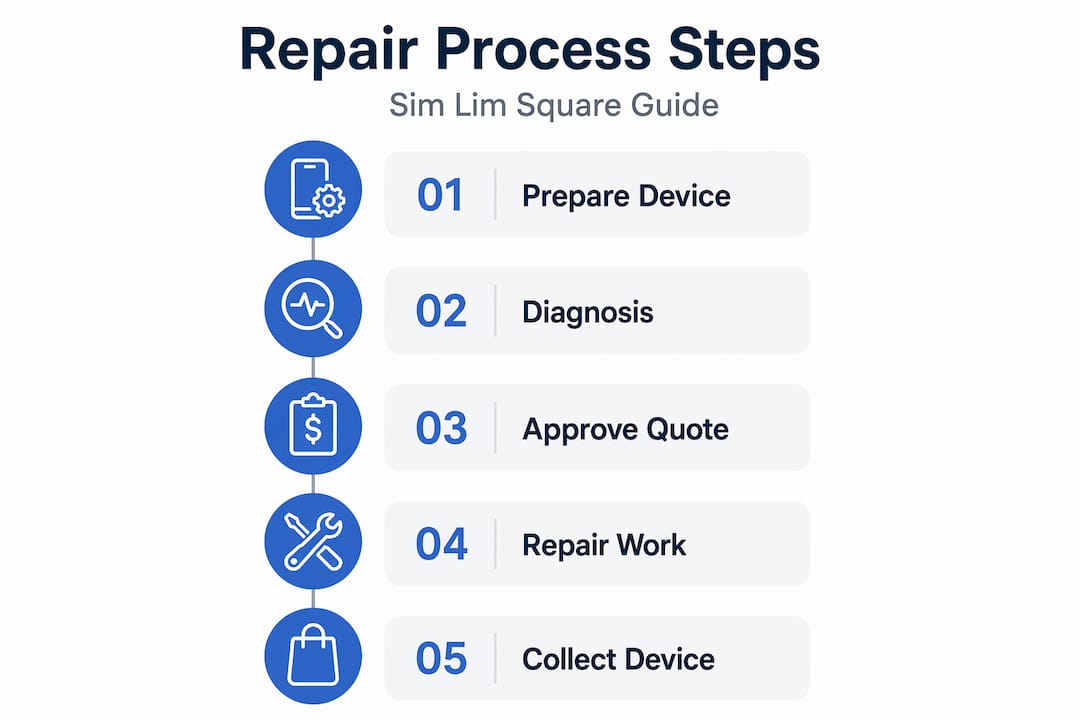
The repair process broadly follows this sequence: prepare at home, arrive and get a diagnosis, approve the quote, wait for the repair, collect and test the device. Each stage matters. Skipping preparation, for example, means you might hand over a device without a data backup, only to discover the repair requires a factory reset. Knowing the full sequence ahead of time puts you in control.
Getting ready before you visit
Most people walk into a repair shop having done zero preparation. That puts you at a disadvantage the moment a technician asks what the device is doing and you say “it’s just broken.” Spend 15 minutes at home and you will get faster service, better quotes, and a much smoother experience overall.
Here is what to sort out before you head to Sim Lim Square:
- Back up your data. Some repairs risk data loss, especially motherboard replacements or anything requiring a factory reset. Use iCloud, Google Drive, or an external hard drive before you go.
- Document the problem. Note exactly what the device does or does not do. When did it start? Did the device get wet or drop? Screenshots or short videos of the malfunction help technicians diagnose faster.
- Check your warranty status. Manufacturer warranties and local retailer warranties may still cover your repair. Bringing your purchase receipt is worth the effort.
- Note the device model and storage capacity. A technician quoting a screen replacement for an iPhone 14 Pro Max versus a standard iPhone 14 will give very different prices. Know exactly which model you own.
- Write down your questions. Ask about part quality, warranty on the repair itself, and estimated turnaround. Arriving with questions prevents you from forgetting something critical in the moment.
| Item to prepare | Why it matters |
|---|---|
| Data backup | Prevents permanent loss during complex repairs |
| Device model details | Enables accurate parts sourcing and pricing |
| Warranty documentation | May reduce or eliminate repair costs |
| Problem description | Speeds up diagnostics significantly |
| Repair questions list | Helps you evaluate shop reliability on the spot |
Pro Tip: *Write your device’s IMEI number down before handing it over. You can find it in Settings or by dialing #06#. It helps confirm you get your exact device back.
Step-by-step: what happens during the repair
Once you are inside Sim Lim Square, the wide variety of electronics stores means repair shops are spread across multiple floors. Use the directory near the building entrance or check Simlimsquareinsider’s floor guide to identify which level has the service type you need. Repair shops tend to concentrate on the upper floors, while retail and accessories dominate the lower levels.
Here is how the typical repair process unfolds:
- Initial consultation and diagnostics. A technician examines your device, asks about the issue, and runs basic tests. Reliable shops offer this free of charge. Transparent pricing upfront is a sign you are dealing with a trustworthy shop.
- Repair quote and approval. You receive a written or verbal quote before any work begins. Never approve work without a clear price and parts specification. Ask whether parts are genuine, OEM-grade, or aftermarket.
- Repair execution. Depending on the service, the technician replaces the faulty component, performs soldering, or runs software corrections. Repair costs typically range from SGD 60 to 200 for common fixes like screens and batteries, varying by device complexity.
- Quality check. After the repair, the shop should test the device in front of you. Screen colors, touch sensitivity, charging, and audio should all be verified before you pay.
- Collection, payment, and warranty documentation. Good shops provide a 90-day repair warranty as standard. Get this in writing. Many shops source parts on-site, which means same-day turnaround is common for straightforward jobs.
Here is a comparison of the most common repair types you will find at Sim Lim Square:
| Repair type | Typical time | Complexity | Typical cost (SGD) |
|---|---|---|---|
| Screen replacement | 1 to 3 hours | Low to medium | 80 to 200 |
| Battery replacement | 30 to 60 minutes | Low | 60 to 120 |
| Charging port repair | 1 to 2 hours | Medium | 70 to 150 |
| Data recovery | 1 to 5 days | High | 150 and up |
| Microsoldering / board repair | 1 to 7 days | Very high | 150 and up |
Pro Tip: For urgent repairs, visit on a weekday morning. Shops are less crowded, technicians have more time for your consultation, and same-day repairs are far more achievable.
Electronics troubleshooting tips for a better outcome
Knowing the technical steps is only half the picture. How you evaluate shops and communicate with technicians has a direct impact on the quality of your repair. These are the habits that separate people who walk away satisfied from those who end up paying twice.
How to identify reputable Sim Lim repair shops:
- Look for shops that display pricing prominently and offer free diagnostics.
- Ask how long the shop has operated at that location. Established businesses in Sim Lim Square have reputations to protect.
- Check whether technicians use branded tools and proper ESD-safe mats. Handling circuit boards without anti-static equipment causes invisible damage.
- Read recent reviews on Google Maps before you visit. Focus on the most recent 20 reviews rather than an overall star rating.
One area many people overlook is software lock challenges. Specialized phone programmers are required after certain hardware swaps to restore features like Face ID or True Tone display. If a shop replaces your iPhone screen without a programmer, you may lose True Tone calibration permanently. Always ask whether the shop has the software tools to match the hardware replacement they are doing.
For more severe damage, microsoldering has transformed what “repairable” means. Advanced microsoldering uses digital microscopes and hot air stations to fix faults on individual components that official service centers refuse to address. A MacBook with a blown charging circuit or an iPhone with a failed baseband chip can sometimes be brought back to full function through this technique. It costs more and takes longer, but it is often far cheaper than replacement.
“The shift toward component-level repair is one of the most meaningful changes in Singapore’s electronics repair scene. It keeps devices out of landfills and puts real money back in people’s pockets.”
Pro Tip: If a shop tells you a device is “unrepairable” without running a full diagnostic, get a second opinion. Component-level repair specialists at Sim Lim Square regularly fix devices that others have written off.
What to expect after your repair
A good repair should extend your device’s useful life by at least two to three years for most phones and laptops. That said, realistic expectations matter. A repaired device is not the same as a brand new one. Managing how you use and maintain it post-repair directly affects how long the fix holds.
Here is what to do once you get your device back:
- Test everything immediately. Do not wait until you are home. Check all functions at the shop while the technician is present. If anything is off, the repair shop can address it on the spot.
- Keep your repair receipt and warranty documentation. If the repaired component fails within the warranty period (usually 90 days), you have grounds for a free re-repair.
- Avoid extreme temperatures and moisture. Repaired devices, particularly those with replaced screens or batteries, may have slightly reduced tolerance to heat or humidity compared to factory-sealed units.
- Use a quality case and screen protector. This is not optional after a screen replacement. A SGD 20 case prevents the need for another SGD 150 repair.
- Monitor battery health regularly. On iPhones, go to Settings → Battery → Battery Health. On Android, third-party apps like AccuBattery provide similar data. If capacity drops below 80% within a year of a battery replacement, contact your repair shop.
When repair is no longer the right answer, the math changes. If a repair costs more than 60% of the device’s current market value, or if the same component has failed more than twice, replacement often makes more economic sense. The Sim Lim Square electronics deals guide is a practical resource when you reach that point and need to buy a replacement at a fair price.
My take on getting repairs right at Sim Lim Square

I have spent a lot of time walking through Sim Lim Square’s floors, talking to technicians, and watching how repairs actually unfold. What I keep seeing is that the gap between a good repair experience and a frustrating one almost always comes down to two things: the quality of your upfront diagnosis and the shop you choose.
The shops that impress me most are the ones investing in microsoldering setups and phone programmers. That equipment signals a technician who understands devices at a circuit level, not just a parts-swapper. Component-level repair is harder, slower, and requires real skill. Shops that offer it are typically the ones you want handling your device for any job, simple or complex.
My honest advice: do not make cost your only filter. I have seen people chase the cheapest screen replacement and end up with a display that loses touch sensitivity within two months. The SGD 30 they saved cost them another full repair. Prioritize shops with documented repair warranties and the tools to back up software-level work.
The repair market at Sim Lim Square is genuinely strong. These are specialists who fix what others cannot, and they do it at prices that make repair a real alternative to replacement. Use that expertise.
— Aloysius
Explore Sim Lim Square repair resources
Whether you are still deciding which shop to trust or you want to scout the building before your first visit, Simlimsquareinsider has you covered. The platform brings together shop directories, repair service overviews, and practical guides built specifically for Singapore’s electronics consumers.

Start with the Sim Lim Square floor guide to find repair shops by level before you arrive. Then browse the full range of guides, vendor profiles, and tech video tours at Simlimsquareinsider to compare services, read expert breakdowns, and make confident repair decisions. When you know what to expect walking in, the entire experience gets smoother and the results get better.
FAQ
What is the typical cost of a repair at Sim Lim Square?
Common repairs like screen and battery replacements generally range from SGD 60 to 200, depending on the device model and repair complexity. Advanced services like microsoldering or data recovery cost more and depend on the extent of the damage.
How long do electronics repairs take at Sim Lim Square?
Many standard repairs such as battery or screen replacements are completed the same day, often within one to three hours. Complex jobs like board-level microsoldering or data recovery can take several days.
Do Sim Lim Square repair shops offer warranties on their work?
Yes. Reputable shops typically offer a 90-day repair warranty covering the replaced parts and labor. Always ask for written warranty documentation before approving any repair.
Will my Face ID still work after a screen replacement?
Not automatically. Screen replacements without a phone programmer can disable Face ID and True Tone on iPhones. Confirm that your chosen shop has the software tools to restore these functions as part of the repair.
How do I find a trustworthy repair shop in Sim Lim Square?
Look for shops that offer free diagnostics, display pricing clearly, and carry genuine or OEM-grade parts. Checking recent Google Maps reviews and asking about repair warranty terms are reliable ways to evaluate shops before committing.
Recommended
- Why Sim Lim Square is Singapore’s best for electronics repairs – Sim Lim Square Insider
- Electronics store types at Sim Lim Square for smart shopping – Sim Lim Square Insider
- Explore Sim Lim Square Shop Categories for Tech Bargains – Sim Lim Square Insider
- Best strategies to find electronics deals at Sim Lim Square – Sim Lim Square Insider