

In-store tech support at Sim Lim Square explained
TL;DR:
- Sim Lim Square offers immediate in-store tech support for various devices, providing on-the-spot diagnosis and repairs. To avoid scams, consumers should research shops, verify prices, and ensure warranties before trusting repairs on any floor. Preparation and community-recommended shops help maximize positive outcomes and cost savings during visits.
Sim Lim Square has a reputation that cuts both ways. On one hand, it’s the go-to destination in Singapore for fast, affordable electronics repairs. On the other, cautionary tales about tourist traps and overcharging have made some shoppers hesitant. The reality is more nuanced and far more useful than either extreme suggests. Whether your phone screen just shattered, your laptop is crawling, or you’ve lost critical files, understanding how in-store tech support actually works here can save you time, money, and a lot of stress. This guide breaks it all down clearly.
Table of Contents
- What is in-store tech support?
- Common services and what to expect at Sim Lim Square
- Choosing a reliable repair shop: Avoid scams and get fair service
- Maximize your Sim Lim Square visit: Best tips for tech support
- Insider take: The uncomfortable truth about in-store tech support in Singapore
- Get more from your Sim Lim Square visits
- Frequently asked questions
Key Takeaways
| Point | Details |
|---|---|
| Broad service range | In-store tech support at Sim Lim Square covers everything from quick phone repairs to advanced data recovery. |
| Pick trusted shops | Choose stores with good online reviews, visible price lists, and clear warranty policies to avoid scams. |
| Ask about timing | Simple jobs are often finished the same day, but advanced repairs can take several days. |
| Stay informed and prepared | Research before you visit, back up data, and never rush into leaving your device until you are comfortable. |
| Use available resources | Benefit from guides, directories, and video tours to make your Sim Lim Square visits safer and more efficient. |
What is in-store tech support?
In-store tech support means walking into a physical shop and getting hands-on help from a technician right there. No shipping your device overseas, no waiting days for a remote diagnosis, and no chatting with a bot. You describe the problem, a technician examines the device, and you get a quote and timeline on the spot.
At Sim Lim Square, this service covers a wide range of devices and issues. You’ll find shops handling everything from cracked smartphone screens to failed hard drives. Common problems that bring people through the doors include:
- Cracked or unresponsive phone screens
- Laptops running slowly or overheating
- Devices that won’t power on
- Data loss or corrupted storage
- Virus infections and malware
- Camera servicing and lens repairs
- Operating system failures or crashes
Some jobs are completed while you wait. A screen replacement or RAM upgrade can often be done in under 30 minutes. Others, like data recovery from a failed drive, can take several days depending on the severity of the damage.
The key difference between in-store support and online or remote support is immediacy and accountability. A technician physically handles your device, which allows for more accurate diagnosis. You can ask questions directly and observe the process. Services include phone screen replacements starting at SGD 60+ for same-day repairs, laptop RAM upgrades from SGD 30+, data recovery, software diagnostics, virus removal, OS reinstalls, and camera servicing.
Here’s a quick overview of what you can expect:
| Service | Estimated cost | Typical turnaround |
|---|---|---|
| Phone screen replacement | SGD 60+ | Same day, under 30 min |
| Laptop RAM upgrade | SGD 30+ | Same day, under 1 hour |
| Virus removal | SGD 50 to SGD 100 | Same day to next day |
| OS reinstall | SGD 50 to SGD 80 | Same day |
| Data recovery | SGD 150 to SGD 400+ | 2 to 5 days |
| Motherboard repair | SGD 100 to SGD 300+ | 3 to 7 days |
| Camera servicing | SGD 60 to SGD 150 | Same day to next day |
Prices vary between shops, and always confirm the quote before authorizing any work.
Common services and what to expect at Sim Lim Square
Knowing what services exist is one thing. Understanding how the process actually unfolds helps you walk in with realistic expectations and ask the right questions.
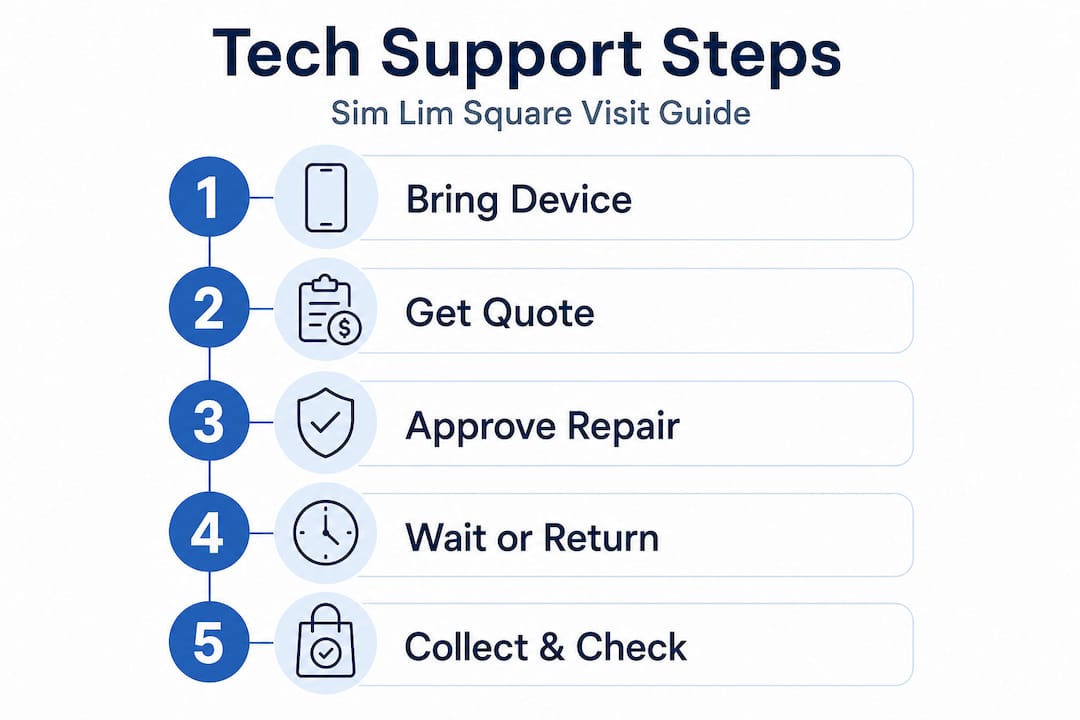
A typical in-store repair visit goes like this:
- Describe your problem at the counter clearly and concisely.
- Technician inspects the device and identifies the fault.
- You receive a verbal or written quote covering parts and labor.
- Confirm the timeline and ask about warranty coverage.
- Leave the device or wait depending on the job complexity.
- Technician contacts you when the repair is complete.
- Test the device before paying and get a receipt.
Simple jobs like screen replacements or software fixes are often completed while you wait in under 30 minutes, which is a huge advantage for busy shoppers. Complex repairs like motherboard reflowing or full data recovery take considerably longer, sometimes spanning several days, and require you to leave the device.
Here’s a comparison of simple versus complex repair scenarios:
| Job type | Example | Duration | Cost range | Warranty likely? |
|---|---|---|---|---|
| Simple | Screen replacement | Under 30 min | SGD 60 to SGD 150 | Often yes |
| Simple | RAM upgrade | 30 to 60 min | SGD 30 to SGD 80 | Often yes |
| Complex | Data recovery | 2 to 5 days | SGD 150 to SGD 400+ | Rarely |
| Complex | Motherboard reflow | 3 to 7 days | SGD 100 to SGD 300+ | Sometimes |
One thing worth paying attention to is whether the shop uses original manufacturer parts or third-party alternatives. Third-party parts are cheaper but may affect device performance or void manufacturer warranties. Always ask which type of parts will be used before agreeing to the repair.
Pro Tip: For quick jobs like screen swaps or RAM installs, stay in the shop and watch. A trustworthy technician won’t mind you observing, and you’ll have better visibility into exactly what’s being done to your device.
For more nuanced advice specific to individual shops, the local gadget shop tips guide on Sim Lim Square Insider breaks down the best options by device type.
Choosing a reliable repair shop: Avoid scams and get fair service
Picking the wrong shop is where most bad Sim Lim Square experiences originate. The mall has hundreds of stores across six levels, and not all operate with equal transparency. Knowing how to evaluate a shop before you hand over your device is the most important skill you can develop here.

Start with research before you even arrive. Consumers should research shops via reviews and Google, prioritize those with an online presence and visible price lists, and avoid high-pressure sales tactics on lower floors, which have historically targeted tourists. Reviews on Google Maps and tech forums are your best starting point.
Watch for these warning signs when you approach a counter:
- Salesperson won’t give a written quote
- Price changes after you’ve agreed to proceed
- Demand for a large upfront deposit before any inspection
- Vague or no warranty terms offered
- Unusually low prices that seem too good to be true
- Dismissive or evasive answers to direct questions
The upper floors of Sim Lim Square are more reliable for repairs than the basement or first floor levels. If you feel held hostage, overcharged, or misrepresented, you have the right to escalate. Contact the Consumers Association of Singapore (CASE) hotline at 1800-773-3100 or, in serious cases, involve the police.
“The real risk at Sim Lim Square isn’t the mall itself but the lack of preparation most visitors show up with. Scams thrive on information gaps. Close the gap and the risk drops significantly.” — Sim Lim Square Insider editorial team
Before handing over any device, run through this checklist:
- Back up all data you can access
- Note your device’s serial number and any pre-existing cosmetic damage
- Confirm the exact repair needed and agree on a price in writing
- Ask about parts origin (original vs. third-party)
- Request a warranty certificate or written receipt
- Clarify the timeline and collection process
The table below gives a snapshot of key factors to evaluate when comparing shops:
| Factor | What to look for | Red flag |
|---|---|---|
| Online presence | Google listing, reviews, website | No digital footprint |
| Price transparency | Posted price list or clear verbal quote | Prices revealed only after inspection |
| Deposit policy | No deposit or minimal, refundable | Large mandatory deposit before diagnosis |
| Warranty | Written warranty offered | Verbal only or none |
| Parts policy | Clear answer on original vs. third-party | Evasive or dismissive |
For a broader breakdown of shops by category and specialty, the shop categories for bargains guide is a useful companion. And if you’re unsure which level to head to for a specific type of repair, the navigating Sim Lim Square floors guide maps out exactly where to go.
Pro Tip: Always get a receipt. Even a basic one. It’s your primary protection if a dispute arises later.
Maximize your Sim Lim Square visit: Best tips for tech support
Getting the most from your visit isn’t just about knowing what you need repaired. It’s about preparation, pricing awareness, and knowing which shops have earned their reputation the hard way.
Community-vetted shops are worth seeking out specifically. Recommended shops include GW Mobile at #01-49 for phone repairs with a 9-day warranty, GJ Tech at #02-77 for professional repairs with clear explanations and follow-up support, and Oriental Trading Hub at #04-44A for PC and laptop repairs plus data recovery with no upfront deposit required. These shops have been mentioned repeatedly in community discussions for their fair pricing and consistent service quality.
The no-deposit policy at a shop like Oriental Trading Hub matters more than it might seem. It signals that the shop is confident enough in its work to not require money before a diagnosis. Shops that demand large deposits upfront before even looking at your device are often working a different angle entirely.
Here’s a practical list of things to remember before and during your visit:
- Back up your data before dropping off any device, no exceptions
- Compare prices across at least two shops before committing to a repair
- Ask the technician to explain the fault in plain language you understand
- Check the repaired device thoroughly before leaving the shop
- Keep your receipt and note the warranty period and what it covers
- Ask about turnaround time upfront and get a contact number for updates
- Avoid peak weekend hours if you want more attention from staff
The best experiences at Sim Lim Square consistently come from people who arrive knowing what they need, what it should roughly cost, and which floor to start on. Browsing the finding tech deals guide beforehand gives you a grounding in pricing that makes it far harder for any shop to overcharge you.
Pro Tip: Use shops with visible certifications or long-standing community endorsements. These are hard to fake and signal that the shop values its reputation over a single transaction.
Insider take: The uncomfortable truth about in-store tech support in Singapore
Here’s something most guides won’t tell you directly: the stigma around Sim Lim Square has become a bigger barrier than the actual risks for most consumers. The horror stories that circulate online are real but they’re also increasingly dated. The mall has evolved, shop accountability has improved, and the community around it, including forums, review platforms, and guides like ours, has made it significantly harder for bad actors to operate without consequence.
That said, the risk doesn’t disappear just because awareness has grown. It shifts to less-informed visitors, typically tourists or first-timers who arrive without doing any homework. Smart locals treat Sim Lim Square as a resource, not a gamble. They know which floors to prioritize, which shops to research beforehand, and how to walk away from a counter that feels off.
The conventional advice of “just avoid the first floor” is an oversimplification. There are legitimate shops on every level, and there are problematic ones further up too. What actually determines your outcome is preparation and confidence. A shopper who knows the going rate for a screen replacement, asks direct questions, and expects a written receipt is a much harder target than one who walks in without a clue.
We’ve watched plenty of visitors turn what could have been a $300 mistake into a $70 fix simply by comparing quotes and referencing community recommendations before committing. The Sim Lim Square repair experience doesn’t have to be stressful. It’s genuinely one of the most cost-effective options in Singapore for device repairs when you approach it correctly.
The uncomfortable truth is that a great outcome at Sim Lim Square is mostly in your hands before you walk through the door.
Get more from your Sim Lim Square visits
Planning your tech support trip doesn’t have to mean guesswork. Sim Lim Square Insider provides repair guides, vetted shop recommendations, and practical resources designed specifically for shoppers who want results without the runaround.
Before your next visit, explore the directory of recommended agents to identify specialists matched to your specific repair need. For a visual walkthrough of the mall layout, the Sim Lim Square video tours let you scout shop locations from your phone before you arrive. Whether you’re chasing a same-day screen fix or a complex data recovery job, the right resources turn a potentially stressful trip into a fast and satisfying one.
Frequently asked questions
What devices can I bring for in-store tech support at Sim Lim Square?
You can bring phones, laptops, cameras, and most consumer electronics for repair or troubleshooting. Services include phone screen replacements, laptop RAM upgrades, and camera servicing, covering a wide range of common devices.
How much does a phone screen replacement usually cost?
A typical phone screen replacement starts at around SGD 60 and is often completed the same day, depending on the phone model and parts availability.
How can I avoid scams when seeking repairs?
Check shop reviews online, use shops on upper floors where possible, verify price lists before agreeing to work, and avoid high-pressure sales tactics or unclear warranty terms when dealing with any counter.
Do all repairs provide warranties?
Not all repairs come with warranties. Reputable shops typically offer limited warranties, but refurbished items without warranties are common in basement-level shops, so always confirm before proceeding.
How long does a typical repair take?
Simple jobs under 30 minutes like screen replacements are common, while complex work such as data recovery or motherboard repairs can stretch to several days depending on the fault.
Recommended
- How to find the best tech deals at Sim Lim Square – Sim Lim Square Insider
- Explore Sim Lim Square Shop Categories for Tech Bargains – Sim Lim Square Insider
- Why Sim Lim Square is Singapore’s best for electronics repairs – Sim Lim Square Insider
- Sim Lim Square Insider | Comparing Tech Deals with Funan Mall