

CCTV Security Systems: Your Complete Buying Guide
TL;DR:
- Choosing a CCTV system requires understanding the differences between analog, HD-over-coax, IP, and hybrid options to meet specific security needs and budgets. Wired PoE systems outperform wireless setups by providing continuous recording without internet dependence, ensuring greater reliability and data control. Proper security practices, like updating firmware and segmenting networks, are essential to prevent cyber vulnerabilities associated with internet-connected cameras.
Choosing a CCTV system is not as simple as picking a camera off a shelf. The term itself now covers everything from basic analog setups to AI-powered IP networks, and the gap between those options is enormous. Whether you are securing a single-family home or a multi-floor commercial property, understanding how CCTV surveillance technology has evolved will save you money, prevent costly mistakes, and ensure you actually get the protection you paid for. This guide covers system types, installation approaches, real pricing, and the security risks most buyers never think to ask about.
Table of Contents
- Key takeaways
- CCTV system types explained
- Installation methods and what they mean for reliability
- Understanding the real costs
- Security and privacy risks you need to know
- How to choose the right CCTV system
- My honest take on the CCTV market
- Find your next CCTV system at Sim Lim Square
- FAQ
Key takeaways
| Point | Details |
|---|---|
| Not all CCTV is equal | Analog, HD-over-coax, IP, and hybrid systems serve different budgets and security needs. |
| Wired PoE outperforms wireless | Wired systems record continuously without internet dependency or monthly cloud fees. |
| Local storage saves money | NVR and DVR storage eliminate subscription costs and protect your data from third-party access. |
| Network cameras carry real risk | Internet-connected cameras can be exploited if firmware and access controls are not managed. |
| Match the system to your needs | Property scale, threat level, and budget should drive your choice, not marketing claims. |
CCTV system types explained
The word “CCTV” technically means closed-circuit television, referring to video signals transmitted to a limited, private set of monitors rather than broadcast publicly. The term is now generic for virtually all video monitoring setups, but the underlying technology varies significantly. Here is what each category actually means for you.
Analog systems
Analog CCTV is the original format. Cameras transmit video over coaxial cable to a digital video recorder (DVR) for storage. Analog systems transmit up to 500 feet over coaxial cabling without signal amplification and deliver around 0.4 megapixels of resolution. That is usable but far below what modern IP cameras offer.
The appeal is simplicity. Analog gear is cheap, widely available, and operates completely independently of any computer network. For a small retail store or a warehouse where you just need basic visual coverage, analog remains a reliable option without the complexity of IT infrastructure.
HD-over-coax systems
HD-over-coax technologies (including TVI, AHD, and CVI formats) deliver high-definition resolution over existing coaxial cable. This is a popular upgrade path for properties that already have analog wiring. You get better image quality without ripping out walls to run new cable. Resolutions of 1080p and even 4K are achievable, which closes much of the gap with IP systems at a lower installation cost.
IP CCTV systems
IP cameras are the current standard for serious security. They transmit video as digital data over a network, typically using Power over Ethernet (PoE) cables that carry both data and power through a single cable run. The recorder is a network video recorder (NVR). Resolution starts at 1080p and scales up to 8MP, 12MP, and beyond.
Security professionals consistently recommend wired PoE IP camera systems for robust, scalable security because they operate independently of Wi-Fi congestion and protect against footage loss during internet outages. They also support advanced features like motion analytics, license plate recognition, and remote viewing without relying on cloud subscriptions.
Hybrid systems
Hybrid NVRs or DVRs accept both analog and IP camera inputs. They are ideal for businesses transitioning from legacy analog setups to IP technology without replacing everything at once. You keep existing cameras on the coaxial runs and add IP cameras where higher resolution or analytics are needed.
Quick system comparison
| System type | Resolution | Recorder | Best for |
|---|---|---|---|
| Analog | Up to 0.4MP | DVR | Budget installs, small sites |
| HD-over-coax | 1080p to 4K | DVR | Upgrading existing analog wiring |
| IP (wired PoE) | 1080p to 12MP+ | NVR | Scalable, high-reliability installs |
| Hybrid | Mixed | Hybrid DVR/NVR | Phased upgrades from analog to IP |
Installation methods and what they mean for reliability
How you install a CCTV security system matters just as much as which cameras you choose. There are three real-world approaches: wired PoE, wireless Wi-Fi, and mixed deployments.
Wired PoE installations run a single Cat5e or Cat6 cable from each camera back to the NVR or a PoE switch. That cable handles power and data. The result is a system that records continuously, regardless of what your internet connection is doing. There are no dropped signals, no bandwidth competition with other smart home devices, and no cloud subscription required. The trade-off is physical installation work. Running cables through walls, ceilings, and conduit takes time and sometimes requires professional labor.
Wireless Wi-Fi cameras are easier to install but introduce real limitations. Wi-Fi cameras suffer from dropped connections and require cloud subscriptions that add to total cost of ownership. When your router goes down or your internet service has an outage, recording either stops or gaps appear in your footage timeline. For a business that needs dependable evidence-grade video, that is a serious problem.

Mixed deployments combine wired cameras at critical points (entrances, cash registers, server rooms) with wireless cameras in lower-priority areas. This balances installation cost and reliability where it matters most.
Here is how the main installation factors compare:
- Recording continuity: Wired PoE records through internet outages; Wi-Fi may not
- Signal reliability: Wired is immune to interference; Wi-Fi competes with neighboring networks and physical obstructions
- Installation cost: Wired requires cable runs; wireless requires only power outlets
- Ongoing cost: Wired has no subscription fees; consumer Wi-Fi cameras often require paid cloud plans
- Scalability: Wired PoE scales cleanly; Wi-Fi can degrade with more cameras on the same network
Pro Tip: If you are installing CCTV for a business or want continuous, evidence-grade footage, prioritize wired PoE for your most critical camera positions even if you use wireless cameras elsewhere. The wiring cost is a one-time expense. Subscription fees and gaps in footage are recurring problems.
Consumer-friendly options like DIY Wi-Fi systems are convenient but best suited for residential use. Serious business security benefits from professional monitoring and AI-driven analytic filters that reduce false alarms and provide verified alerts.
Understanding the real costs
CCTV pricing is where marketing and reality often diverge. A camera that costs $50 upfront can end up costing more over three years than a system that costs $400 at purchase. Here is what the numbers actually look like.
Wired NVR systems
A complete 8-channel 4K NVR system with multiple PoE cameras is available around $320, significantly below traditional bundled pricing of $600 to $900. That price includes a pre-installed hard drive (typically 1TB to 4TB), supports 24/7 continuous recording, and carries no monthly cloud fees. Over a three-year period, you spend nothing beyond electricity.
Consumer Wi-Fi cameras
A four-camera wireless system might cost $200 upfront. Add a cloud storage subscription at $10 to $20 per month per camera, and you are spending $480 to $960 annually just on storage. Over three years, that is well over $1,400 for a system with lower reliability than a comparable wired setup.
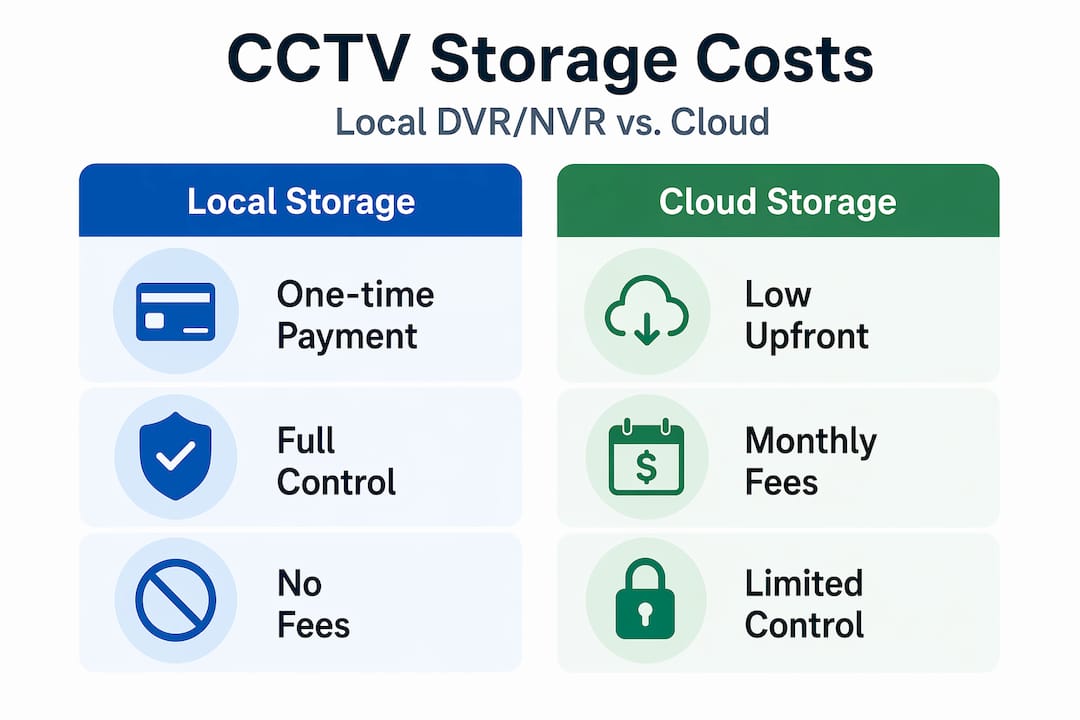
Local NVR and DVR storage are preferred precisely because they eliminate subscription fatigue and give you full control over your footage.
Storage cost comparison
| Storage method | Upfront cost | Monthly fee | Data control |
|---|---|---|---|
| NVR/DVR (local) | Medium to high | None | Full |
| Cloud (subscription) | Low | $10 to $30/camera | Limited |
| Hybrid (local + cloud backup) | Medium | Low | Partial |
Pro Tip: When budgeting for CCTV, calculate total cost of ownership over three years, not just the purchase price. A wired NVR system that costs more upfront will almost always be cheaper and more reliable than a subscription-based wireless alternative over the same period.
Security and privacy risks you need to know
CCTV surveillance technology connected to the internet introduces cybersecurity risks that most buyers overlook entirely. The cameras protecting your property can become entry points into your network or tools used against you.
Internet-connected cameras have been compromised and used for espionage, with live footage transmitted to foreign actors while bypassing local privacy protections. This is not a theoretical risk. It has happened in documented national security cases involving cameras deployed at sensitive locations.
Here are the core practices for keeping your CCTV system secure:
- Change default usernames and passwords immediately after installation
- Update camera and NVR firmware on a regular schedule, at least quarterly
- Place cameras on a separate network segment (VLAN) isolated from your main business network
- Disable remote access features you do not actively use
- Audit connected devices regularly and remove any camera you cannot verify
CCTV cameras with remote access that have never had their default credentials changed are one of the most common entry points for network intrusions. Treat your cameras like you treat a server, not like you treat a light bulb.
From a legal perspective in the United States, you generally have the right to surveil your own property. You cannot record in spaces where people have a reasonable expectation of privacy (bathrooms, changing rooms). Outdoor cameras covering public sidewalks or neighboring properties should be positioned carefully. Posting visible CCTV notices is good practice and, in some states and businesses, required.
How to choose the right CCTV system
Picking the best CCTV cameras for your situation comes down to matching the system’s capabilities to your actual security requirements. Here is a structured way to think through that decision:
-
Define your coverage area. Count the number of entry points, perimeters, and interior zones you need to monitor. A home with four exterior corners needs a different camera count than a retail store with multiple aisles and a back office.
-
Assess your threat profile. General deterrence needs are served by visible cameras with moderate resolution. High-value commercial environments or locations with prior incidents need higher resolution, analytics, and professional monitoring.
-
Match resolution to purpose. License plate capture requires a minimum of 2MP with the right lens and placement. Facial recognition in a lobby needs at least 4MP. Wide-area outdoor coverage is fine at 1080p.
-
Evaluate installation constraints. Older buildings with thick concrete walls or rentals where you cannot run new cable may push you toward wireless. Purpose-built or owned commercial properties should default to wired PoE.
-
Check vendor support. Warranty length, local service availability, and firmware update history matter more than brand recognition. A camera without firmware updates in three years is a security liability, not an asset.
-
Compare and verify before buying. Use the floor guide at Sim Lim Square to identify vendors who carry multiple brands and can demonstrate systems in person. Testing a camera’s night vision or remote access interface before purchase will prevent a lot of post-installation frustration.
If you want broader context on tech retail trends that affect product availability and pricing, the 2026 commercial trends guide from Simlimsquareinsider covers shifts in the Singapore electronics market worth knowing before you shop.
My honest take on the CCTV market
I have spent a lot of time looking at how people buy CCTV systems, and the pattern I keep seeing is this: buyers are drawn to whatever is easiest to set up, not whatever is best suited to their actual needs. The consumer Wi-Fi camera category has brilliant marketing behind it. Unboxing a small wireless camera and having it working in ten minutes feels like progress. But ease of setup and quality of security are not the same thing.
In my experience, the buyers who end up most satisfied are the ones who invested upfront in a wired PoE NVR system, even when the initial installation felt like more work. They have footage that runs continuously, no subscription bills to worry about, and complete control over their data. The buyers who went cheap on wireless often come back asking why their system has no footage from the night something actually happened. Usually it is because the internet was down, the cloud subscription lapsed, or the motion trigger missed the event.
The cybersecurity angle is something I feel strongly about. As AI-integrated surveillance scales globally (China alone has reached 600 million cameras across state and private networks), the vulnerabilities in cheap, internet-connected hardware become more attractive targets. Choosing cameras from manufacturers with a clear firmware update policy and keeping your system on an isolated network is not paranoia. It is basic security hygiene that most residential buyers are never told.
If your installation is complex, get professional advice. The cost of a consultation is minor compared to redoing a cable run or replacing a compromised system.
— Aloysius
Find your next CCTV system at Sim Lim Square
Simlimsquareinsider is your go-to resource for navigating Singapore’s most trusted electronics hub when it comes to CCTV security systems. Sim Lim Square houses a wide range of specialist vendors carrying IP cameras, NVR kits, analog systems, and professional installation services, all under one roof.

Whether you are a homeowner comparing outdoor CCTV options or a business owner evaluating a multi-camera NVR deployment, the tech video tours on Simlimsquareinsider give you a real walkthrough of what is available before you visit. You can see products demonstrated, compare vendors side by side, and walk in knowing exactly what questions to ask. Use the savvy shopper buying guide to get the best value on your next CCTV purchase.
FAQ
What is the difference between analog and IP CCTV?
Analog CCTV transmits video over coaxial cable to a DVR and delivers around 0.4 megapixels of resolution, while IP CCTV sends digital video over network cables to an NVR at resolutions starting at 1080p and scaling much higher.
Are wired CCTV systems better than wireless?
Yes, for most security applications. Wired PoE systems provide higher reliability, uninterrupted recording during internet outages, and carry no monthly fees, making them the preferred choice for serious residential and commercial use.
How much does a complete CCTV system cost?
A complete 8-channel 4K wired NVR system with cameras and a pre-installed hard drive is available for around $320, with no recurring subscription costs, compared to consumer Wi-Fi setups that can cost significantly more over time due to cloud fees.
Can CCTV cameras be hacked?
Yes. Internet-connected cameras have been exploited for espionage and unauthorized surveillance. Changing default credentials, updating firmware regularly, and isolating cameras on a separate network segment significantly reduces this risk.
Is it legal to install CCTV at my home or business?
In the United States, you can legally monitor your own property with CCTV as long as cameras are not placed in areas where people have a reasonable expectation of privacy, such as bathrooms or changing rooms. Posting visible camera notices is recommended practice and required in some contexts.
Recommended
- Sim Lim Square Essentials List: What Every Tech Shopper Needs – Sim Lim Square Insider
- Sim Lim Square floor guide: shop smart for electronics – Sim Lim Square Insider
- Sim Lim Square buying guide for savvy shoppers – Sim Lim Square Insider
- Explore Sim Lim Square Shop Categories for Tech Bargains – Sim Lim Square Insider