

Printer Buying Guide for Home and Small Business 2026
TL;DR:
- Choosing the right printer depends on your monthly volume, content type, and long-term cost considerations.
- Inkjets are suitable for low volumes and photo printing, while laser and ink tank models excel at high-volume, predictable tasks, with all-in-one functions providing added convenience.
A printer is a device that converts digital files into physical documents, images, or photos by applying ink or toner to paper. Whether you print invoices weekly or family photos occasionally, the right printer saves you money and frustration. Brands like Epson, HP, and Canon dominate the market with models ranging from compact wireless inkjet units to high-speed laser workhorses. The wrong choice costs you more per page than it should, or leaves you with dried ink and missed deadlines. This guide cuts through the noise so you can match the right device to your actual needs.
What are the main printer types and how do they differ?
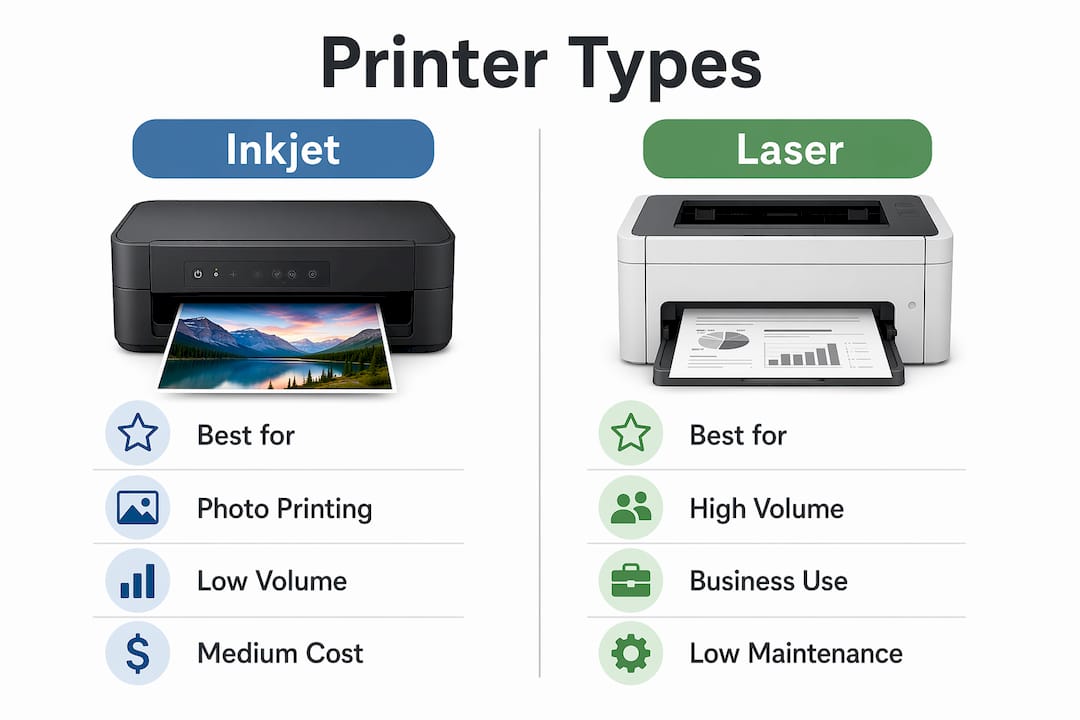
Printers fall into four main categories, and each serves a distinct purpose. Knowing the difference before you buy prevents the most common and costly mistake: choosing a printer built for someone else’s workflow.
Inkjet printers spray liquid ink onto paper through microscopic nozzles. They produce rich color output and sharp photo prints, making them the go-to choice for home users who print photos, school projects, or mixed-content documents. The Canon PIXMA TS3722, for example, delivers wireless all-in-one printing with dual-band Wi-Fi setup and prints 7.7 images per minute in black. That speed suits light home use without overwhelming the budget.
Laser printers use toner powder fused to paper with heat. Laser toner does not dry out like ink, making laser printers ideal for predictable, low-maintenance document output in office environments. The HP Color LaserJet Pro MFP 3301sdw prints up to 26 pages per minute in color and carries ENERGY STAR certification. For a small business printing contracts, reports, or invoices daily, that speed and reliability matter far more than photo quality.

Ink tank printers replace disposable cartridges with refillable reservoirs. The Epson EcoTank ET-3850 comes with up to two years of ink included, yielding 7,500 black pages and 6,000 color pages per fill. That yield makes ink tanks the most cost-efficient option for moderate-to-high volume users who want to avoid the cartridge replacement cycle.
All-in-one (multifunction) printers combine printing, scanning, and copying in a single unit. They suit both home offices and small businesses that need to digitize documents without buying separate hardware. The table below summarizes the key differences:
| Type | Best for | Cost per page | Maintenance level |
|---|---|---|---|
| Inkjet | Photos, mixed color | Medium | Medium |
| Laser | High-volume documents | Low at volume | Low |
| Ink tank | Frequent mixed printing | Very low | Medium |
| All-in-one | Home office, small business | Varies by engine | Medium |
Pro Tip: If you print photos regularly, prioritize an inkjet or ink tank model with at least six ink colors. Four-color inkjets produce visible banding on skin tones and gradients.
How to choose the best printer based on your print volume
Matching printer choice to actual print volume and speed requirements delivers better satisfaction than chasing technical specs alone. HP’s use-case guide organizes printer selection around three volume tiers, and that framework holds up in practice.
-
Under 50 pages per month. A wireless all-in-one inkjet is the right fit. The Canon PIXMA TS3722 or similar compact models handle light home printing without demanding a large upfront investment. Setup takes minutes via a smartphone app, and the smaller footprint suits apartments and home offices with limited desk space.
-
50 to 200 pages per month. At this volume, a standard inkjet cartridge becomes expensive fast. An ink tank printer like the HP Smart Tank or Epson EcoTank cuts your running costs significantly. You print enough pages each month to recoup the higher purchase price within weeks, not years.
-
200 or more pages per month. A color laser multifunction printer is the right tool. The HP Color LaserJet Pro MFP 3301sdw handles this volume with speed and consistency. Toner cartridges last far longer than ink cartridges at this output level, and the per-page cost drops as volume rises.
One factor most buyers overlook is print frequency, not just volume. If you print 30 pages but spread them across a single day each month, an inkjet’s ink can dry in the print head between sessions. HP recommends ink tank printers for infrequent use because the larger reservoir keeps ink flowing even after weeks of inactivity. This is a more practical consideration than resolution specs for most home users.
Pro Tip: Before buying, track your actual monthly page count for two weeks and double it. Most people underestimate their print volume, which leads to buying a printer one tier below what they actually need.
What does a printer really cost over time?
The sticker price of a printer tells you almost nothing about what it will actually cost you. The real number is cost per page, and the gap between printing systems is dramatic.
Standard inkjet cartridges cost roughly 15 cents per black page and 62 cents per color page. The HP Smart Tank system drops that to 0.4 cents per black page and 1.7 cents per color page. At 150 pages per month, the Smart Tank pays back its higher purchase price in approximately two months. For users printing 300 or more pages monthly, the annual savings exceed $2,700 compared to standard cartridges. That figure reframes the ink tank’s upfront cost entirely.
Subscription services like HP Instant Ink charge a flat monthly fee based on page count rather than cartridge purchases. This model suits users with predictable, low-to-medium monthly volume who want cost certainty. The risk is paying for pages you do not use, so it rewards consistent printers more than sporadic ones.
Color printing costs notably more than black-and-white across every printing system. If your small business prints mostly text documents, selecting a printer with a dedicated black ink tank or high-yield black toner cartridge reduces your per-page cost without sacrificing quality on the occasional color job.
- Ink tank printers carry a higher purchase price but deliver the lowest long-term cost per page
- Standard cartridge inkjets cost less upfront but become expensive above 50 pages per month
- Laser toner costs less per page than ink at high volumes and does not expire from drying
- Subscription plans work best for users with consistent, predictable monthly print needs
- Color pages cost three to four times more than black-and-white pages across all systems
Pro Tip: When comparing printer prices at retail, calculate the cost of one year of ink or toner at your expected volume. Add that to the purchase price. That total is your real first-year cost.
Essential setup and maintenance tips for long-lasting performance
A printer that sits unused for three weeks is a printer that will frustrate you the next time you need it. Inkjet print heads dry out when ink sits motionless in the nozzles, and weekly test prints are the simplest way to keep ink flowing. This takes less than 30 seconds and prevents the far more time-consuming process of running multiple cleaning cycles to restore print quality.
For small business users, productivity features matter as much as print speed. Auto document feeders and duplex printing reduce manual effort and paper waste significantly. The Epson EcoTank ET-3850 bundles an ADF, auto two-sided printing, and a 250-sheet paper tray into a single unit. That combination eliminates the need to stand at the printer flipping pages or reloading paper mid-job.
Wireless setup has become the standard for home and small office use. Most current models from HP, Canon, and Epson connect via dual-band Wi-Fi and support mobile printing through apps like HP Smart or Epson iPrint. Ethernet connectivity remains valuable for small businesses where multiple users share one device and need a stable, consistent connection.
Proper paper handling prevents the majority of paper jams. Load paper flush against the guides, never overfill the tray, and use paper that matches the printer’s recommended weight. Most inkjet and laser models specify 20 lb to 24 lb bond paper for standard documents. Using heavier cardstock without checking the printer’s media specifications causes jams and can damage the feed rollers over time.
Key takeaways
The right printer is determined by your monthly page volume and content type, not by the highest spec sheet you can find.
| Point | Details |
|---|---|
| Match type to volume | Under 50 pages monthly suits inkjet; 200+ pages monthly suits laser or ink tank. |
| Calculate real cost | Add one year of ink or toner to the purchase price to find your true first-year spend. |
| Ink tank saves money | HP Smart Tank costs 0.4 cents per black page vs. 15 cents for standard cartridges. |
| Print weekly | Running a test print weekly prevents inkjet nozzle clogging and costly cleaning cycles. |
| All-in-one adds value | ADF and duplex features reduce manual effort and improve small business productivity. |
Why I think most people buy the wrong printer for the wrong reasons
Most buyers walk into a store or scroll through a product page and fixate on resolution numbers and wireless features. I understand the instinct. Those specs are visible and easy to compare. But after years of watching people replace printers they barely used, I am convinced the single biggest mistake is ignoring print frequency.
A person who prints 20 pages a month but does it all in one sitting is a completely different user from someone who prints five pages every week. The first person can get away with a budget inkjet. The second person needs an ink tank or a laser printer, because the gaps between print sessions will dry out a standard inkjet’s head and turn every printing session into a troubleshooting session.
The other mistake I see consistently is undervaluing all-in-one models. People assume the scanner and copier functions are extras they will never use. Then they need to digitize a contract or copy a document and realize the standalone printer they bought cannot do it. For home offices and small businesses, a multifunction device simplifies the entire workflow. The Epson EcoTank ET-3850 is a good example of a printer that earns its price through features, not just print volume capacity.
My honest recommendation: spend 10 minutes calculating your actual monthly page count and the split between color and black-and-white. That single exercise will tell you more about which printer to buy than any spec comparison. The electronics deals at Sim Lim Square often include ink tank and laser models at competitive prices, which makes the math on total cost of ownership even more favorable.
— Aloysius
Find your next printer at Sim Lim Square Insider
Simlimsquareinsider covers the full range of printers available through Singapore’s premier electronics destination, Sim Lim Square. Whether you are looking for a compact wireless inkjet for home use, an ink tank model to cut long-term costs, or a laser multifunction unit for your small business, the guides on Simlimsquareinsider help you match the right device to your actual printing profile.
The Sim Lim Square floor guide shows you exactly where to find printer retailers across the building, including stores that offer product testing before purchase and local warranty support. For buyers who want to stretch their budget further, the in-store tech support guide explains how to get expert advice on setup, maintenance, and model selection directly from trusted retailers at Sim Lim Square.
FAQ
What is the best printer for home use in 2026?
A wireless all-in-one inkjet suits most home users printing fewer than 50 pages per month. The Canon PIXMA TS3722 and Epson EcoTank ET-3850 are strong options depending on whether you prioritize low upfront cost or low cost per page.
How does an ink tank printer differ from a standard inkjet?
An ink tank printer uses refillable reservoirs instead of disposable cartridges, dropping the cost per black page from roughly 15 cents to 0.4 cents. The tradeoff is a higher purchase price that pays back in approximately two months at 150 pages per month.
How do I prevent my inkjet printer from clogging?
Print at least one test page per week to keep ink flowing through the nozzles. If print quality drops, run the printer’s automatic cleaning cycle first before attempting a manual clean.
Is a laser printer worth it for a small business?
A laser printer is worth it for any business printing 200 or more pages per month. Laser toner does not dry out, maintenance demands are low, and models like the HP Color LaserJet Pro MFP 3301sdw deliver 26 pages per minute with scanning and copying built in.
What should I look for in a multifunction printer?
Prioritize an auto document feeder, automatic duplex printing, and a paper tray capacity of at least 250 sheets. These three features reduce manual intervention and make the device genuinely useful for both printing and document scanning in a small office.