

Best Graphics Cards in 2024: Your Complete Buying Guide
What are the best graphics cards you can buy right now?
The short answer: the AMD Radeon RX 9070 XT is a strong value GPU choice for many people in 2024, the NVIDIA GeForce RTX 5090 leads in performance, and the Intel Arc B580 offers solid budget performance. Everything else falls somewhere in between, and the right pick depends almost entirely on your resolution target and how much you want to spend.
Here is the full comparison across all major options currently available in the US market.
| GPU | Best For | Price Range | Performance Tier | VRAM | PCIe | Brand |
|---|---|---|---|---|---|---|
| NVIDIA GeForce RTX 5090 | Ultimate 4K and AI workloads | $1,999+ | Flagship | 32GB GDDR7 | PCIe 5.0 | NVIDIA |
| NVIDIA GeForce RTX 5080 | 4K gaming with ray tracing | $999+ | High-end | 16GB GDDR7 | PCIe 5.0 | NVIDIA |
| NVIDIA GeForce RTX 5070 Ti | 1440p to 4K gaming | $699+ | High-end | 16GB GDDR7 | PCIe 5.0 | NVIDIA |
| AMD Radeon RX 9070 XT | 1440p gaming with ray tracing | $599+ | High-mid | 16GB GDDR6 | PCIe 5.0 | AMD |
| NVIDIA GeForce RTX 5070 | 1440p gaming with ray tracing | $549+ | Mid-high | 12GB GDDR7 | PCIe 5.0 | NVIDIA |
| AMD Radeon RX 9070 | 1440p gaming on a budget | $449+ | Mid | 16GB GDDR6 | PCIe 5.0 | AMD |
| AMD Radeon RX 7900 XTX | 4K gaming enthusiasts | $699+ | High-end | 24GB GDDR6 | PCIe 4.0 | AMD |
| AMD Radeon RX 7900 XT | 4K gaming at competitive price | $549+ | High-mid | 12GB GDDR6 | PCIe 4.0 | AMD |
| NVIDIA GeForce RTX 4080 | Enthusiast gaming, 4K creation | $799+ | High-end | 16GB GDDR6X | PCIe 4.0 | NVIDIA |
| AMD Radeon RX 6900 XT | High-refresh 1440p and 4K | well under $400 | High-mid | 16GB GDDR6 | PCIe 4.0 | AMD |
| NVIDIA GeForce RTX 5060 Ti | 1080p gaming enthusiasts | well under $400 | Mid | 8GB/16GB GDDR7 | PCIe 5.0 | NVIDIA |
| NVIDIA GeForce RTX 3080 | High-refresh 4K and 1440p | — | High-mid | 12GB GDDR6 | PCIe 4.0 | NVIDIA |
| Intel Arc B580 | Mainstream gaming and productivity | $249+ | Mid | 12GB GDDR6 | PCIe 4.0 | Intel |
| AMD Radeon RX 9060 XT | Affordable 1080p gaming | $299+ | Entry-mid | 8GB/16GB GDDR6 | PCIe 5.0 | AMD |
| NVIDIA GeForce RTX 5060 | Budget 1080p gaming | $299+ | Entry-mid | 8GB GDDR7 | PCIe 5.0 | NVIDIA |
| NVIDIA GeForce RTX 3060 | 1080p gaming, budget builds | $199+ | Entry-mid | 12GB GDDR6 | PCIe 4.0 | NVIDIA |
| Intel Arc B570 | Entry-level gaming and multitasking | $179+ | Entry | 12GB GDDR6 | PCIe 4.0 | Intel |
| Intel Arc Graphics | Entry-level gaming and productivity | $149+ | Entry | 6GB–8GB GDDR6 | PCIe 4.0 | Intel |
Quick verdict by use case:
- Ultimate 4K / AI workloads: RTX 5090 (32GB GDDR7, no competition at this tier)
- Best 4K value: AMD Radeon RX 9070 XT or RTX 5080 depending on your software ecosystem
- Best 1440p overall: AMD Radeon RX 9070 XT, with the RTX 5070 as the NVIDIA alternative
- Best budget 1080p: Intel Arc B580 at $249 or the RTX 3060 for proven reliability
- Tightest budget: Intel Arc B570 at $179 gets you into discrete GPU territory for very little
Which GPU brands and models should you consider in 2026?
Three manufacturers supply virtually every discrete GPU on the market: NVIDIA, AMD, and Intel. Each has a distinct product ladder, and knowing where each brand sits helps you shop faster.

NVIDIA’s RTX lineup
NVIDIA’s current generation is the RTX 50 series, built on the Blackwell architecture. The RTX 5090 sits at the top with 32GB of GDDR7 memory, followed by the RTX 5080 (16GB GDDR7) for serious 4K gaming. The RTX 5070 Ti and RTX 5070 cover the 1440p sweet spot, while the RTX 5060 Ti and RTX 5060 target 1080p buyers on tighter budgets. The previous RTX 40 series (Ada Lovelace) is still widely available. The RTX 4080 remains a strong 4K card, and the RTX 3080 and RTX 3060 from the Ampere generation are worth considering at discounted prices.
Key NVIDIA models by segment:
- Flagship: RTX 5090
- High-end: RTX 5080, RTX 4080
- Mid-high: RTX 5070 Ti, RTX 5070
- Mid: RTX 5060 Ti, RTX 3080
- Entry-mid: RTX 5060, RTX 3060
AMD’s Radeon RX lineup
AMD’s newest cards run on RDNA 4 architecture. The RX 9070 XT and RX 9070 are the headline releases, targeting 1440p and competitive 4K gaming at prices well below NVIDIA’s equivalent tier. The RX 9060 XT covers affordable 1080p gaming. The previous RDNA 3 generation (RX 7900 XTX, RX 7900 XT) still competes at 4K, especially the RX 7900 XTX with its 24GB VRAM. The RDNA 2 era RX 6900 XT is a solid used-market pick for 1440p gaming.
Key AMD models by segment:
- Flagship: RX 9070 XT, RX 7900 XTX
- High-mid: RX 7900 XT, RX 6900 XT
- Mid: RX 9070
- Entry-mid: RX 9060 XT
Intel Arc
Intel entered the discrete GPU market with its Arc lineup, targeting budget and mainstream buyers. The Arc B580 at $249 with 12GB GDDR6 is the standout, offering more VRAM than most competitors at its price. The Arc B570 at $179 is the entry point. The broader Intel Arc Graphics line covers the most affordable segment, starting around $149.
What GPU specs actually matter when you’re choosing?
Specs on a GPU box can feel like alphabet soup. Here is what each one actually means for your experience.

VRAM (video memory): This is the spec that bites buyers hardest when they underbuy. For serious 4K gaming, at least 12GB of VRAM is recommended to sustain high frame rates at ultra settings. The RTX 5090’s 32GB and the RX 7900 XTX’s 24GB are overkill for most games today but future-proof for AI workloads and next-generation titles. At 1080p, 8GB is workable but 12GB gives you more headroom.
GPU architecture: Architecture determines how efficiently a chip processes tasks. NVIDIA’s Blackwell (RTX 50 series) and AMD’s RDNA 4 (RX 9000 series) are the current generations. Older architectures like Ada Lovelace (RTX 40) and RDNA 3 (RX 7000) still perform well but lack some newer features.
Memory bandwidth: The AMD Radeon RX 9070 XT, for example, delivers 640 GB/s memory bandwidth on a 256-bit bus, which directly affects how fast the GPU can move texture data. Higher bandwidth matters most at 4K where texture loads are heaviest.
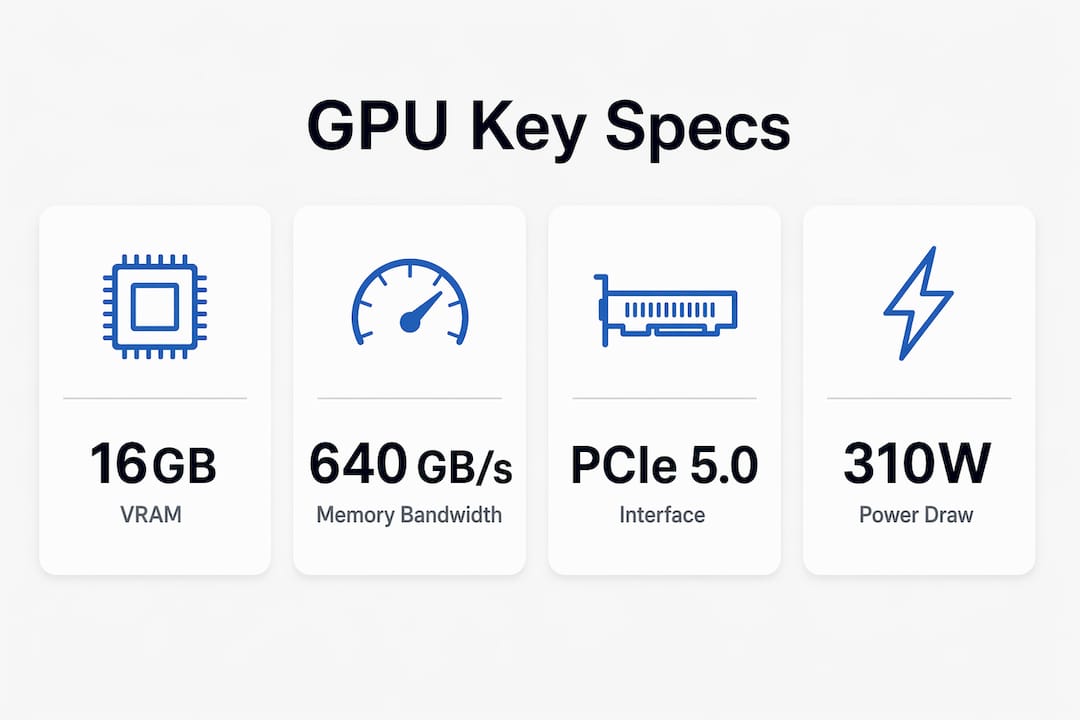
PCIe version: PCIe 5.0 is the current standard on RTX 50 and RX 9000 series cards. PCIe 4.0 cards (RTX 40, RX 7000, Intel Arc B-series) still perform at full speed on PCIe 4.0 motherboards. Backward compatibility means a PCIe 5.0 card works in a PCIe 4.0 slot, just without the theoretical extra bandwidth.
TGP (total graphics power): This is how many watts the card draws under load. The RX 9070 XT draws around 290–310W under load, typical for high-mid tier cards. Budget accordingly for your power supply.
Upscaling tech: NVIDIA’s DLSS and AMD’s FSR are software features that render at a lower resolution and upscale intelligently, boosting frame rates. DLSS is exclusive to NVIDIA hardware. FSR 4 runs on AMD’s RDNA 4 cards and competes closely with DLSS 3 in supported titles, though game adoption is still growing.
| Spec | Why It Matters | What to Look For |
|---|---|---|
| VRAM | Texture storage; limits max resolution and settings | 8GB minimum; 12GB+ for 1440p/4K |
| Memory bandwidth | Data throughput to GPU cores | Higher = better at 4K |
| TGP (watts) | Power draw; determines PSU requirement | Match to your PSU headroom |
| PCIe version | Slot compatibility | PCIe 4.0 or 5.0 both work on modern boards |
| Upscaling support | Frame rate boost via AI rendering | DLSS (NVIDIA) or FSR 4 (AMD RDNA 4) |
| Output ports | Monitor connectivity | HDMI 2.1 and DisplayPort for 4K |
What do graphics cards cost in the US right now?
GPU pricing in the US spans a wide range, and the tier you land in should match your resolution target, not just your budget ceiling.
Entry level ($149–$299): Intel Arc B570, Intel Arc Graphics, NVIDIA RTX 5060, AMD RX 9060 XT, and the RTX 3060 all live here. The RTX 3060 at around $199 is a proven 1080p card with 12GB GDDR6. The Intel Arc B580 at $249 is arguably the best value in this bracket given its 12GB VRAM. For finding the best deals on these entry cards, checking deal aggregators during major retail events pays off.
Mid tier ($299–$549): The RTX 5060 Ti, AMD RX 9070, RTX 3080, and AMD RX 6900 XT sit here. The RX 6900 XT on the used market can be found well under $400 and still handles 1440p gaming at high refresh rates. The RX 9070 at $449 is the new benchmark for 1440p value.
High-mid tier ($549–$799): The AMD RX 9070 XT, RTX 5070, AMD RX 7900 XT, and RTX 4080 compete here. The RX 9070 XT is a well-regarded card in this price bracket. The RTX 4080 is more difficult to justify compared to newer models unless you specifically need features like DLSS 3 or NVENC.
High-end and flagship ($999+): The RTX 5080 starts around $999. The AMD RX 7900 XTX at $699 is the outlier here, offering 24GB VRAM at a price that undercuts most NVIDIA competition. The RTX 5090 is a top-tier card commanding a premium price point.
A note on custom models: Premium aftermarket cards from ASUS ROG Strix, Sapphire NITRO+, and GIGABYTE AORUS carry price premiums for enhanced cooling and factory overclocks. Those premiums can be worthwhile for builders who want quieter operation or plan to push clocks further. For buyers focused purely on frame rates, a reference or base partner card usually delivers the same gaming performance for less money. You can explore computer parts pricing across different retail environments to find the best deals.
How do you choose the right graphics card for your needs?
The right GPU is the one that matches your monitor, your PC, and your actual use case. Here is how to work through the decision.
Start with your target resolution:
- 1080p gaming: RTX 5060, RTX 3060, Intel Arc B580, AMD RX 9060 XT
- 1440p gaming: AMD RX 9070 XT, AMD RX 9070, RTX 5070, RTX 5070 Ti
- 4K gaming: RTX 5080, RTX 5090, AMD RX 7900 XTX, AMD RX 9070 XT (at moderate settings)
Check your power supply first. A 700W or higher PSU is recommended for mid-to-high-end cards like the RX 9070 XT, which draws around 290–310W under load. Running a high-draw GPU on an undersized PSU causes instability and can shorten component life.
Measure your case before you buy. Triple-fan cards like the Sapphire NITRO+ RX 9070 XT are physically large. Check your case’s GPU clearance spec against the card’s listed length before ordering.
Watch for CPU bottlenecks. A flagship GPU paired with an older mid-range CPU will not deliver its full potential. If your CPU is more than three generations old, factor in whether an upgrade makes sense alongside the GPU.
Red flags to avoid:
- Cards with no US warranty or gray-market listings from unknown sellers
- Older cards with only 8GB VRAM being sold at near-current prices
- Listings that omit TGP or cooling specs entirely
- Any card requiring a PSU adapter that your current supply does not support
Pro Tip: Prioritize PCIe 5.0 support if you are buying a card you plan to keep for four or more years. The RTX 50 and RX 9000 series both use PCIe 5.0, which gives them more headroom as future platforms evolve. Pair that with at least 16GB VRAM for genuine future-proofing.
What does a graphics card actually do?
A graphics card, also called a video card or GPU, is an expansion card that generates the visual output sent to your monitor. It handles the heavy math required to render 3D scenes, process textures, and calculate lighting in real time. Discrete GPUs are separate from the CPU and have their own dedicated memory, cooling, and power delivery, which is why they outperform integrated graphics by a wide margin for demanding tasks.
Integrated graphics, built into most modern CPUs, share system RAM and are adequate for web browsing, video playback, and light productivity. The moment you push into gaming at medium-to-high settings, 3D modeling in Blender, or video editing in DaVinci Resolve, a dedicated card is not optional.
Common use cases for a dedicated GPU:
- Gaming at 1080p, 1440p, or 4K with high frame rates
- Video editing and color grading (GPU-accelerated rendering in Premiere Pro, DaVinci Resolve)
- 3D modeling and animation (Blender, Cinema 4D, Autodesk Maya)
- AI and machine learning workloads (CUDA on NVIDIA, ROCm on AMD)
- Streaming with hardware encoding (NVENC on NVIDIA, AV1 on Intel Arc)
Pro Tip: If you edit video professionally, NVIDIA’s NVENC encoder is one of the most mature hardware encoders available. It offloads encoding from your CPU entirely, which keeps your timeline playback smooth while exporting in the background.
Expert perspective on GPU performance and value tradeoffs
The GPU market in 2024 is more competitive than it has been in years, and that competition is mostly good news for buyers.
AMD’s RDNA 4 architecture made a real leap in ray tracing performance. The RX 9070 XT delivers competitive ray tracing against NVIDIA at a lower price point, and FSR 4 upscaling is closing the gap with DLSS in supported titles. That said, AMD’s driver ecosystem is still maturing. Occasional driver reinstallation may be needed for optimal compatibility with some titles, a tradeoff worth knowing before you commit.
NVIDIA’s software ecosystem remains its strongest differentiator. DLSS 3 and NVENC are deeply integrated across hundreds of games and creative applications. Switching from NVIDIA to AMD mid-generation can mean losing upscaling quality in titles that only support DLSS, and losing NVENC means your streaming or export workflow changes. Hardware specs alone do not tell that story.
Premium models from Sapphire, ASUS, and GIGABYTE add real value in specific scenarios. The Sapphire NITRO+ RX 9070 XT PhantomLink, for example, runs below 60°C under load and includes integrated power connector monitoring with dynamic throttling for safety. That kind of engineering matters in a small case or a hot room. For a standard mid-tower with decent airflow, a base model card at a lower price point typically provides similar in-game performance.
Physical size and power draw are the two specs buyers most often overlook. Cards drawing over 300W need a PSU with genuine headroom, not just a matching wattage rating. And a card that does not physically fit your case is a return, not a bargain. Check both before you click buy.
For gaming PC components beyond the GPU, the same principle applies: match each part to your actual use case rather than chasing the highest spec number available.
Simlimsquareinsider: a different way to shop for tech hardware
The GPUs compared here are all available through major US retailers like Newegg, Amazon, and Best Buy. If you prefer a hands-on shopping experience where you can see hardware in person, compare prices across multiple vendors in one location, and get advice from specialists before you buy, Simlimsquareinsider covers exactly that kind of retail environment.

Simlimsquareinsider is built around Singapore’s Sim Lim Square, one of Asia’s most well-known electronics destinations, where dozens of stores carry GPUs, PC components, laptops, and peripherals under one roof. The platform’s store directories, deal alerts, and expert guides help you navigate the options without the guesswork of online-only shopping. If you are researching hardware purchases and want to understand how physical retail compares to online pricing, the Simlimsquareinsider resource hub is worth a look as a complementary reference alongside the US market options covered here.
FAQ
What is a graphics card?
A graphics card is a dedicated expansion card that generates visual output for your monitor. It contains a GPU, its own video memory (VRAM), and a cooling system, all separate from your CPU.
What’s a good graphics card for most people?
The AMD Radeon RX 9070 XT is the strongest all-around pick for 1440p gaming in 2024, offering 16GB GDDR6 and competitive ray tracing at a mid-to-high-end price. For 1080p on a budget, the Intel Arc B580 at $249 delivers excellent value.
How much does a decent graphics card cost?
A capable 1080p card starts around $179–$249 (Intel Arc B570, Arc B580). A solid 1440p card runs $449–$599. Flagship 4K cards like the RTX 5090 start at $1,999.
What can a graphics card be used for?
Beyond gaming, dedicated GPUs accelerate video editing, 3D rendering, AI and machine learning workloads, and hardware-accelerated video encoding for streaming. Applications like DaVinci Resolve, Blender, and OBS Studio all benefit directly from a discrete GPU.
Key Takeaways
The AMD Radeon RX 9070 XT delivers the best price-to-performance ratio for 1440p gaming in 2024, while the RTX 5090 leads at 4K with 32GB GDDR7 and no close rival at its tier.
| Point | Details |
|---|---|
| Best overall value | AMD Radeon RX 9070 XT offers 16GB GDDR6 and 640 GB/s bandwidth at a competitive $599+ price. |
| Flagship performance | NVIDIA RTX 5090 with 32GB GDDR7 leads all GPUs for 4K and AI workloads, starting at $1,999. |
| Budget sweet spot | Intel Arc B580 at $249 provides 12GB GDDR6, more VRAM than most rivals at its price point. |
| PSU and size matter | Cards drawing 290–310W under load need a 700W+ PSU and verified case clearance before purchase. |
| Simlimsquareinsider | Covers hands-on hardware shopping at Sim Lim Square, with store guides and deal alerts for tech buyers. |