

How to compare laptop prices in Singapore smartly
TL;DR:
- Knowing your specific needs, budget, and preferred configurations helps you compare laptop deals accurately and avoid overpaying.
- Using multiple platforms, filtering tools, and in-person testing ensures you secure the best value, considering specs, warranty, and bundle extras.
Walking into Sim Lim Square or scanning online retail pages in Singapore, you’re instantly hit with dozens of laptop listings, promotional banners, and bundle offers that all seem to promise the “best deal.” Prices shift weekly, configurations look identical at first glance, and it’s genuinely hard to tell whether that S$200 discount is real savings or clever marketing. This guide walks you through a proven, step-by-step process to cut through the noise, compare laptop prices accurately, and leave with the configuration you actually need at a price you can feel good about.
Table of Contents
- Know your requirements before comparing
- Explore platforms and stores to find current deals
- Use price sorting and filter tools for efficient comparison
- Verify configurations and avoid common pitfalls
- Summarize and compare your shortlisted laptops
- What most shoppers get wrong about laptop price comparison
- Explore more deals and insider tips at Sim Lim Square
- Frequently asked questions
Key Takeaways
| Point | Details |
|---|---|
| Clarify requirements first | Pinpoint your needed specs and preferred brands before comparing laptop prices. |
| Check multiple deal sources | Always review current promotions both online and at Sim Lim Square, as prices fluctuate rapidly. |
| Use sorting tools | Leverage price filters and sorting options online to quickly find laptops within your budget. |
| Verify configuration details | Double-check detailed specs, warranty, and extras before making your purchase. |
| Create comparison table | Summarize top options in a table to clearly weigh value and make a confident choice. |
Know your requirements before comparing
Before diving into comparing prices, it’s crucial to know exactly what you need in a laptop. Skipping this step is the single biggest reason shoppers end up overpaying or buying the wrong machine.
Start by defining your main use case. A university student writing essays needs very different specs from a video editor or a gamer. Usage categories generally fall into: general productivity and web browsing, school and light creative work, professional content creation, gaming, and business travel. Each category has a different ideal RAM amount, processor generation, GPU requirement, and battery life target.
Next, write down your must-have features. Common ones include:
- RAM: 8GB minimum for everyday use, 16GB for multitasking and creative apps, 32GB for heavy video or 3D work
- Storage: 256GB SSD is tight for most users; 512GB is a comfortable baseline; 1TB suits media-heavy workflows
- Screen size: 13 to 14 inches for portability, 15 to 16 inches for desk-heavy setups
- Battery life: At least 8 hours for students or remote workers
- Operating system: Windows, macOS, or ChromeOS depending on your workflow
Understanding laptop configuration basics before you shop saves you from paying a premium for specs you don’t need, or buying something you’ll need to upgrade in six months.
Set a realistic budget range rather than a single fixed number. Having a floor and ceiling (for example, S$1,000 to S$1,400) gives you flexibility to step up if a deal offers meaningful extra value, or pull back if something fits your needs for less.
Pro Tip: Build a quick comparison table before you visit any store or open any website. List your requirements in one column and the benchmark specs you expect from the price range in the second. This becomes your checklist when you’re face-to-face with a sales rep or scanning product detail pages.
| Requirement | Your need | Benchmark (mid-range budget) |
|---|---|---|
| RAM | 16GB | 16GB DDR5 |
| Storage | 512GB SSD | 512GB NVMe SSD |
| Screen | 14 inch FHD | 14 inch 1920x1200 |
| Battery | 8+ hours | 10 hours |
| GPU | Integrated | Intel Iris Xe or AMD Radeon |
Knowing what you want also helps when evaluating laptop upgrade options later, since some models allow RAM or storage expansion post-purchase while others do not.
Explore platforms and stores to find current deals
With your requirements clear, you’ll want to check where the latest deals are listed. Singapore has several reliable channels for tracking promotions, and using them in combination gives you a more accurate picture of true market prices.
Follow these numbered steps to cover the major sources:
- Check deal roundup pages on tech-focused platforms. These aggregate current sale prices across multiple brands and retailers, making it easy to spot which stores are running promotions right now.
- Visit retailer product pages directly. Promotional prices and discount percentages vary frequently based on timing, stock levels, and store-specific bundles.
- Browse Sim Lim Square store listings. Individual retailers within the mall often run offers that aren’t advertised anywhere online.
- Set up price alerts where available, so you’re notified when a specific model drops into your budget.
- Note the date of any deal you screenshot or record. Laptop prices can change overnight during sale periods like Hartalite or major shopping festivals.
For comparing Singapore tech retailers effectively, you need a consistent baseline. Comparing the same model (same processor generation, same RAM and storage configuration, same color variant) across stores is the only apples-to-apples approach.
Comparing deals across mainstream retailers in Singapore using current deal roundups plus each retailer’s own product pages is the most reliable method, since listed promotional prices and discount percentages vary significantly by time and stock availability.

The table below summarizes the primary channels and what each one offers:
| Source | Type | Best for |
|---|---|---|
| Deal roundup sites | Online aggregator | Spotting current cross-retailer discounts |
| Retailer product pages | Direct listing | Confirming exact price and configuration |
| Sim Lim Square stores | Physical retail | Negotiated bundles and in-person testing |
| Mall insider guides | Community resource | Insider tips and lesser-known deals |
Browse Sim Lim Square laptop deals to see what types of promotions the mall regularly features, and check finding electronics deals for strategies specific to navigating Sim Lim Square’s multi-level retail setup.
One important note: don’t just track the headline price. Bundle value matters. A laptop priced S$100 higher at one store might include a carrying bag, extended warranty, or a mouse. Factor those extras into your true cost comparison.
Use price sorting and filter tools for efficient comparison
Now that you’re scanning deals, let’s streamline the process using sorting and filtering tools. Most online catalogs give you powerful tools that many shoppers barely use.
Follow these steps when navigating any online laptop catalog:
- Set your price range filter to your budget floor and ceiling.
- Filter by brand if you have a strong preference. Otherwise, leave it open to see all options.
- Sort by price: low to high to surface the most affordable options first.
- Click through to the product detail page for every option that catches your eye. The listing thumbnail often omits critical details like exact processor generation or RAM type.
- Record the model number, full configuration, and current price in your shortlist document or spreadsheet.
- Refresh your shortlist every day or two during active shopping, since prices can change quickly.
When using online stores for price comparison, sorting and filtering by price on large catalog pages helps you quickly shortlist the lowest current offers for a given budget, but you must verify the exact configuration on each product detail page before committing to any purchase.
Here are the most common mistakes shoppers make when using filter tools:
- Trusting the thumbnail price. The displayed price sometimes reflects the base configuration; the one you actually want (with more RAM or storage) costs more.
- Ignoring the “was/now” pricing context. Check whether the “regular price” shown is genuinely accurate or inflated for marketing purposes.
- Filtering too narrowly too fast. If you lock in too many filters upfront, you might miss a deal on a model you hadn’t considered but which actually fits your needs perfectly.
- Not cross-checking the model number. Laptop model names are often similar across generations; the “Laptop X Pro 14” from 2024 and 2025 can look identical but differ significantly in performance.
Use the finding tech deals guide to understand how to navigate Sim Lim Square’s physical and digital deal landscape simultaneously.
Pro Tip: Open multiple tabs, one per retailer, each filtered to your exact budget range. Then compare the top three results from each side by side. This takes about 10 minutes and gives you a real-time market snapshot far more useful than any single price comparison website.
Verify configurations and avoid common pitfalls
The price isn’t the only factor. Make sure the specs and details match your needs before you buy.
This is where many shoppers lose money. Two listings for the “same” laptop can differ in ways that dramatically affect real-world performance and value. A slight difference in processor suffix (like Intel Core i5 vs. i5 U-series vs. i5 H-series) can mean a 30 to 40 percent gap in performance. Similarly, 8GB soldered RAM is very different from 8GB upgradeable RAM.
Before committing to any purchase, verify these specific details:
- Exact processor model and generation. Not just “Intel Core i7,” but the specific number and series (for example, Core i7-1355U vs. Core i7-13700H).
- RAM type and upgradability. DDR4 vs. DDR5 matters for speed; soldered vs. slotted matters for future upgrades.
- SSD type. NVMe PCIe 4.0 is faster than PCIe 3.0, which is faster than SATA. Budget laptops often use SATA SSDs and don’t advertise it prominently.
- Display resolution and refresh rate. A “Full HD” label covers multiple actual resolutions; check the exact pixel count and whether it’s 60Hz or higher.
- Warranty terms. Local warranty (Singapore-based service center) vs. international warranty affects how easy repairs are. Some gray-market units carry only international coverage.
- Included accessories. Charger type, box contents, and whether software licenses are included all factor into real value.
Always review laptop upgrades guide before buying, especially if you’re considering a base model with plans to expand RAM or storage later.
“When using online stores, verify the exact configuration on the product detail pages before committing.” This applies equally to physical store visits. Ask the sales rep to confirm the exact model number and show you the configuration label on the box.
Watch out for vendors who reuse generic listing photos or copy-paste descriptions across multiple configurations. If a listing shows a photo of a silver laptop but the title says “Space Gray,” that’s a warning sign. When checking specs tips for accuracy, always cross-reference the model number against the manufacturer’s official product page.
Pro Tip: Photograph the retail box and the product detail page side by side before paying. This protects you in case of any post-purchase disputes about what configuration you were sold.
Summarize and compare your shortlisted laptops
Once you’ve checked the prices and specs, bring everything together for your final decision. A structured summary table stops you from making a rushed call under pressure from a sales pitch.
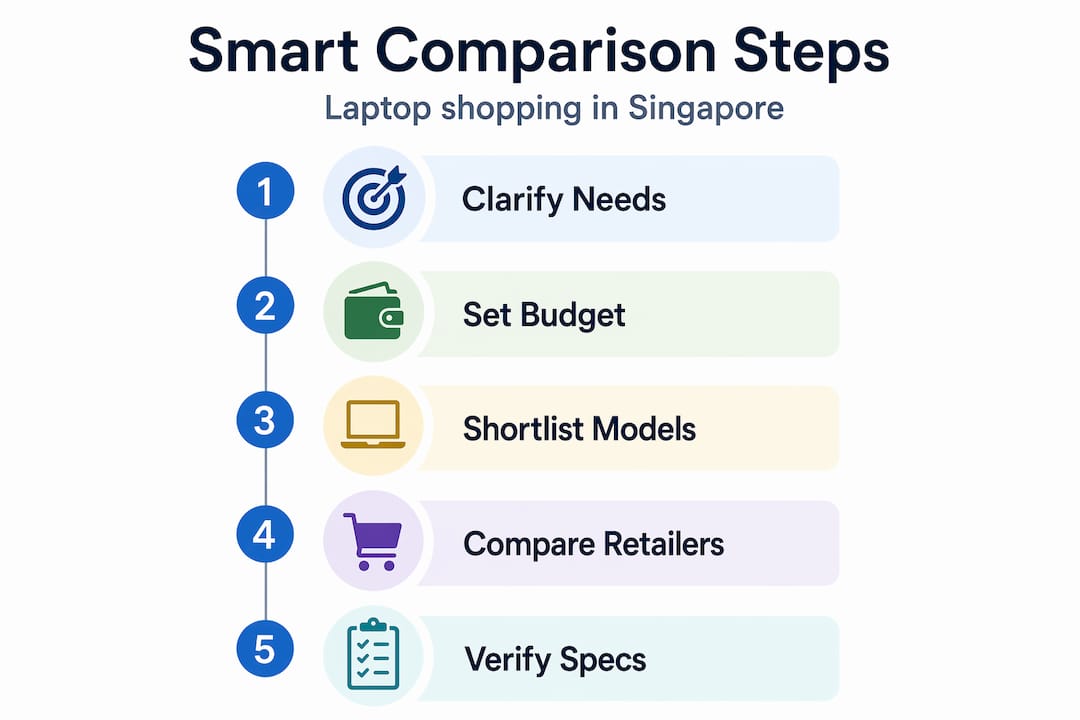
Record your top three to five options using this format:
| Model | Store | Price (S$) | Processor | RAM | Storage | Warranty | Extras |
|---|---|---|---|---|---|---|---|
| Option A | Retailer 1 | 1,199 | i5-1335U | 16GB | 512GB NVMe | 1 yr local | Bag |
| Option B | Retailer 2 | 1,099 | i5-1235U | 8GB | 256GB SSD | 1 yr intl | None |
| Option C | Sim Lim store | 1,150 | i5-1335U | 16GB | 512GB NVMe | 2 yr local | Mouse |
With a table like this, the winner becomes obvious. Option C above offers better warranty and an extra accessory for S$49 more than the cheapest option, which has lower specs and international-only warranty.
Follow these steps to finalize:
- Rank by total value, not just price. Factor in warranty, extras, and upgrade potential.
- Return to your requirements checklist from Section 2. Eliminate any option that misses a must-have.
- Visit the top two options in person at Sim Lim Square if possible. Physically testing the keyboard, screen brightness, and build quality can change your ranking.
- Ask for a bundle deal. In-store retailers often have flexibility on accessories or extended warranty if you ask directly.
- Confirm final price before committing. Prices can vary between what’s listed online and what’s on the shelf that day.
Check electronics deal strategies for specific in-store negotiation approaches that work well at Sim Lim Square.
What most shoppers get wrong about laptop price comparison
You’ve followed the steps. But here’s what even seasoned shoppers often overlook.
The biggest mistake is treating laptop shopping as a pure price race. Shoppers spend hours chasing a S$50 difference between two stores, only to buy a unit with an older processor generation or a weaker SSD that will slow them down within a year. That S$50 saving costs far more in frustration and potential upgrade spend.
Real value at Sim Lim Square comes from three things working together: the right specs for your actual use case, a warranty structure you can rely on, and the extras that reduce your total cost of ownership. A laptop with local warranty support, bundled accessories, and a current-generation processor is often worth paying S$80 to S$150 more upfront.
The second overlooked factor is timing. Sim Lim Square’s independent retailers have pricing flexibility that major chains don’t. If you visit on a weekday, during slower foot traffic hours, or right after a major promotion ends (when stock needs to move), you’re in a better negotiating position. Knowing which stores carry which brands and how stock cycles work is the kind of insider advantage that beats any online price alert.
Finally, don’t ignore the value of being able to test before you buy. Feeling a keyboard, checking screen glare under store lighting, and actually opening and closing the hinge tells you things no product page can. Explore smart deal tactics to understand how to combine online research with in-person negotiation for the best outcomes.
Explore more deals and insider tips at Sim Lim Square
As you prepare for your next laptop purchase, Sim Lim Square Insider can support your search at every stage.
We’ve built the most detailed guide network around Singapore’s iconic tech hub. From store-by-store breakdowns to real-time deal roundups, we help you walk in prepared and walk out confident.
Take a virtual video tour of Sim Lim Square to preview store layouts and get a feel for which levels carry the products you’re after. If you want expert guidance before your visit, connect with Sim Lim Square shopping agents who can help you compare deals in real time. And for the full catalog of tips, guides, and current promotions, browse the Sim Lim Square Insider portal where new content is added regularly to keep your research current and actionable.
Frequently asked questions
How can I get the best laptop deal at Sim Lim Square?
Check the latest promotions using current deal roundups and retailer pages, then compare specs in person and negotiate directly with store staff for bundled accessories or warranty upgrades.
Are online prices always better than Sim Lim Square retail?
Online platforms allow fast sorting and configuration verification, but Sim Lim Square’s in-store retailers often match or beat listed prices when you factor in negotiated bundles, local warranty, and immediate availability.
What is the most common mistake in laptop price comparison?
Focusing only on the headline price without checking configuration and warranty details is the top mistake. As leading deal roundups show, promotional prices vary widely by stock and timing, so specs and warranty terms are what determine real value.
How do I know if a discount is real or just marketing?
Cross-reference the current selling price against the regular price listed on trusted deal sites that publish explicit sale vs. regular prices for named configurations, not just vague percentage-off banners.
Recommended
- Why compare tech retailers in Singapore for smart shopping – Sim Lim Square Insider
- Laptop upgrades: Boost performance and shop smart in Singapore – Sim Lim Square Insider
- Understand laptop configuration: make smart choices – Sim Lim Square Insider
- Top tech deals in Sim Lim Square: save more on electronics – Sim Lim Square Insider