

Electronics Maintenance Services: Your 2026 Device Care Guide
TL;DR:
- Electronics maintenance involves scheduled cleaning, repairs, and preventive care to extend device lifespan. Proper tool use, manufacturer guidelines, and prompt troubleshooting are essential to avoid costly damage. Adopting proactive routines and choosing authorized or qualified repair services ensure devices remain reliable and functional over time.
Electronics maintenance services are defined as the scheduled and reactive care routines that keep personal devices, including laptops, smartphones, and tablets, performing at their best through cleaning, repair, and preventive management. Brands like Dell and Apple have built structured programs around this concept. Dell Care Plus delivers 24/7 hardware support with repairs completed within one to two business days after remote diagnosis. Apple relies on authorized service providers to maintain device integrity, especially for components like batteries. Whether you own a single smartphone or a full home office setup, understanding your maintenance options is the single most effective way to extend device lifespan and avoid expensive replacements.
What are maintenance services for electronics?
Maintenance services for electronics cover three core activities: cleaning to remove debris and contaminants, repair to restore failed or damaged components, and preventive care to stop problems before they start. The term “facility management services” is more commonly applied to buildings and commercial maintenance, but the same principle applies to personal tech. You manage your devices proactively, or you pay to recover them reactively. Preventive maintenance reduces abrupt device failures and delivers measurable cost and performance benefits over time. That single insight should shape every decision you make about how you care for your gadgets.
What tools and preparation do you need for electronics maintenance?
Effective maintenance starts before you touch the device. Powering down and unplugging every device before cleaning or inspection is non-negotiable. Consumer Reports recommends microfiber cloths and cleaning wipes for screens, and warns explicitly against paper towels, which scratch surfaces, and harsh chemical cleaners, which strip coatings.
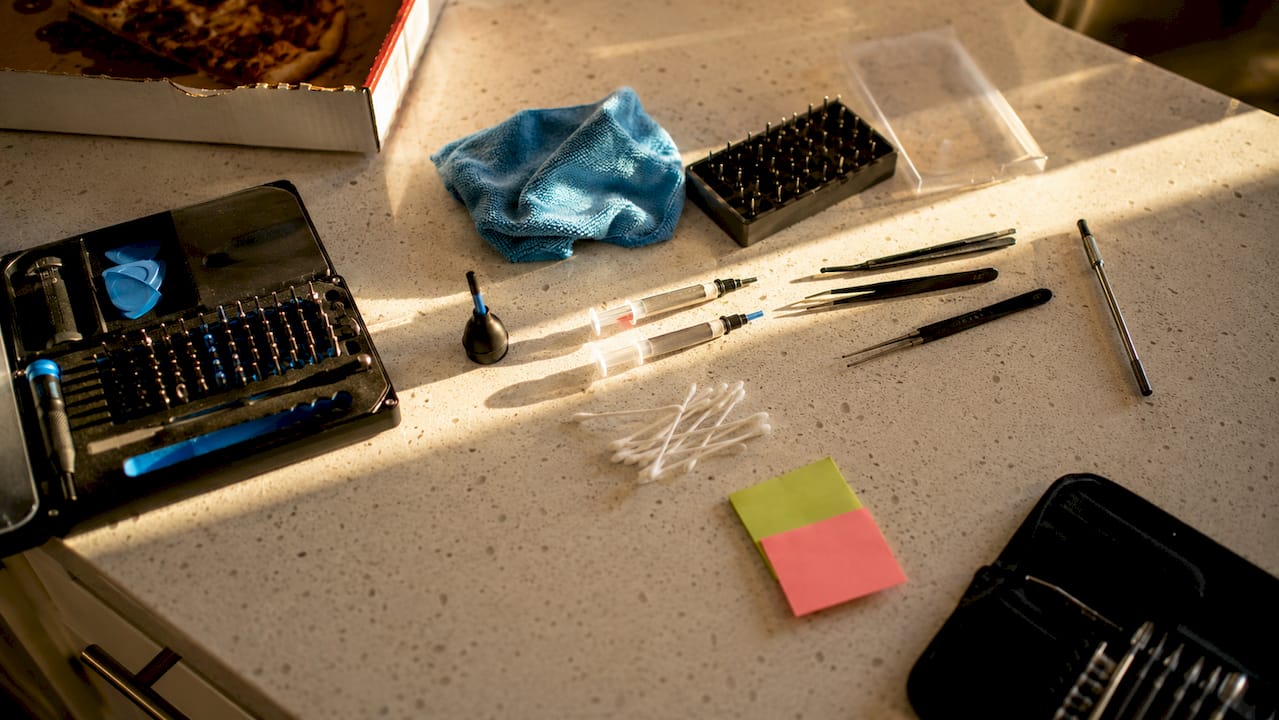
The right toolkit makes a measurable difference. Cotton swabs reach speaker grilles and port openings without scratching. A soft makeup brush dislodges dust from keyboard gaps and vents. Compressed air, despite its popularity, can force debris deeper into ports or damage fan bearings in laptops. Always check the manufacturer manual for brand-specific guidance before applying any product to a surface.
| Tool | Recommended use | What to avoid |
|---|---|---|
| Microfiber cloth | Screen and body wiping | Paper towels (scratch risk) |
| Cotton swabs | Port and speaker cleaning | Metal tools or toothpicks |
| Soft makeup brush | Keyboard and vent dusting | Compressed air cans |
| Isopropyl alcohol (70%) | Stubborn smudges on non-screen surfaces | Bleach or ammonia-based cleaners |
| Manufacturer-approved wipes | Touchscreens and glass panels | Generic household sprays |
Pro Tip: Before cleaning any device, photograph your setup and note any existing scratches or damage. This protects you if you later need to file a warranty or protection plan claim.
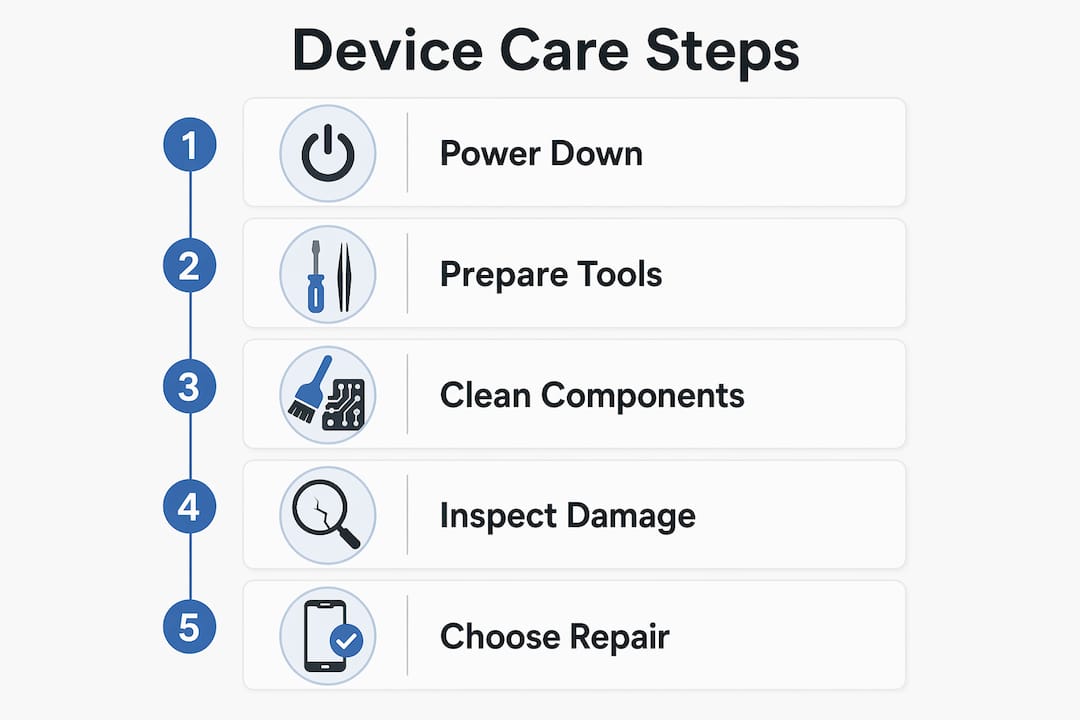
Checking the manufacturer’s documentation is not optional. Apple, Samsung, and Dell each publish specific cleaning guidelines that differ by material and coating. Following them keeps your warranty intact and prevents accidental damage that voids coverage.
How do you choose the best repair option for your device?
Three repair pathways exist for consumer electronics: manufacturer or authorized service, independent repair shops, and DIY. Each carries distinct trade-offs across cost, warranty protection, and diagnostic capability.
Authorized service is the most reliable path for devices with proprietary software dependencies. Apple locks batteries to iPhones, meaning only authorized providers can reset service indicators and verify genuine parts. An unauthorized battery replacement, even with a genuine Apple battery, triggers a persistent “Service” alert that only Apple or an Apple Authorized Service Provider can clear. Dell Care Plus and Dell Care Premium go further, offering AI-based proactive monitoring that flags hardware issues before they cause failures. For devices still under warranty, authorized service is almost always the right call.
Independent repair shops offer real cost savings and faster turnaround on common repairs like screen replacements and charging port fixes. Under U.S. law, third-party repairs generally do not void iPhone warranties unless the repair itself causes additional damage. That legal protection matters. The limitation is diagnostics. Independent shops lack access to manufacturer-level software tools, which means some performance issues or battery health readings may remain unresolved after the repair.
DIY repairs suit technically confident users replacing straightforward components like batteries or RAM. The risks are real: incorrect disassembly can damage ribbon cables, strip screws, or void remaining warranty coverage. Using certified replacement parts from reputable sources reduces risk significantly.
| Repair option | Cost | Warranty impact | Diagnostic depth | Best for |
|---|---|---|---|---|
| Authorized service | Higher | Protected | Full proprietary access | In-warranty devices, Apple products |
| Independent repair | Moderate | Minimal legal risk | Limited software tools | Out-of-warranty, common repairs |
| DIY | Lowest | Varies by damage caused | None | Confident users, simple components |
Key factors to weigh before choosing:
- Whether your device is still under manufacturer warranty
- Whether the repair involves proprietary software resets (Apple batteries, for example)
- Your comfort level with disassembly and the availability of certified parts
- Total cost including parts, labor, and potential follow-up repairs
For laptop repair decisions specifically, the cost of a professional repair versus the device’s current market value is the most practical filter.
What preventive maintenance routines keep electronics running longer?
Preventive care is the highest-return activity in electronics ownership. Simple maintenance steps like removing dust from charging ports prevent hardware failures that appear complex but are entirely avoidable. A monthly cleaning routine costs nothing but time and eliminates the most common causes of port failure, overheating, and speaker degradation.
Battery management deserves special attention. Avoiding charge and temperature extremes reduces capacity loss and extends device lifetime. Keeping a lithium battery between 20% and 80% charge, and away from heat sources like direct sunlight or car dashboards, preserves cell chemistry over hundreds of charge cycles. Most modern devices, including iPhones and MacBooks, include built-in charging limit settings specifically for this purpose.
A practical monthly preventive routine looks like this:
- Power down the device completely and unplug all cables.
- Wipe the screen and body with a microfiber cloth.
- Use a cotton swab to clear debris from charging ports, headphone jacks, and speaker grilles.
- Inspect the charging cable for fraying or bent connectors.
- Check battery health in device settings and note any significant capacity drop.
- Update the operating system and firmware to the latest version.
- Back up all data to an external drive or cloud service.
Pro Tip: Set a recurring monthly calendar reminder labeled “Device Health Check.” Treating maintenance like a scheduled appointment, rather than a reaction to problems, is the single habit that separates devices that last five years from those that fail in two.
Scheduled inspections also catch minor issues before they become expensive repairs. A slightly loose charging port, addressed early with a gentle cleaning, costs nothing. Left unattended, the same port can fail entirely and require a board-level repair costing hundreds of dollars.
What are common maintenance mistakes and how do you troubleshoot them?
The most damaging maintenance mistakes share a common trait: they apply force or chemicals where neither belongs. Using sharp objects to clear ports, pressing hard on screens during cleaning, and spraying liquid directly onto devices are the three errors Consumer Reports flags most consistently. Each one causes the kind of damage that voids warranties and turns a simple fix into a costly replacement.
Ignoring manufacturer guidelines is equally costly. Protection plans from providers like Staples include prepaid two-way shipping and 24/7 online claims, but those benefits only apply when the damage falls within covered categories. Filing a claim for damage caused by improper cleaning or unauthorized modification typically results in denial. Documentation matters as much as coverage.
Common troubleshooting steps for frequent issues:
- Charging problems: Clean the port with a dry cotton swab before assuming hardware failure. Debris is the leading cause of intermittent charging.
- Battery alerts: On Apple devices, a “Service” warning after a battery swap almost always indicates an unauthorized replacement. Only an authorized provider can resolve this.
- Performance lag: Check for background apps consuming resources, then run a storage cleanup. If lag persists after a restart and cleanup, schedule a professional diagnostic.
- Overheating: Clear vents with a soft brush and check that the device is not resting on fabric surfaces that block airflow.
“The best time to address a device issue is the moment you notice it. Waiting turns a $20 cleaning into a $200 repair.”
When troubleshooting fails after two attempts, professional service is the right call. Authorized repair agents have diagnostic tools that no consumer-level approach can replicate, and catching a hardware fault early through professional inspection costs far less than emergency repair after failure.
Key takeaways
Effective electronics maintenance combines preventive cleaning, smart battery habits, and the right repair pathway to maximize device lifespan and minimize total cost of ownership.
| Point | Details |
|---|---|
| Define your maintenance approach | Combine regular cleaning, battery management, and timely repairs rather than reacting to failures. |
| Use the right tools | Microfiber cloths, cotton swabs, and isopropyl alcohol outperform compressed air and household cleaners. |
| Match repair to device status | Choose authorized service for in-warranty or Apple devices; independent repair for out-of-warranty common fixes. |
| Battery care is non-negotiable | Keep charge between 20% and 80% and avoid heat exposure to preserve cell capacity over time. |
| Document everything | Photograph damage, keep receipts, and understand claim logistics before you need a protection plan. |
Why I think most people are getting electronics maintenance backwards
Most device owners treat maintenance as something you do after a problem appears. That reactive mindset is the reason the average smartphone lifespan in consumer hands is shorter than the hardware is actually capable of delivering. I have seen this pattern repeatedly: a device that could run well for five or six years gets replaced at three because the owner never cleaned a charging port or managed a battery setting.
The repair-versus-DIY debate also gets framed wrong. The real question is not “can I do this myself?” but “what does this specific repair require at the software level?” For Apple devices, that distinction is critical. Authorized repair advantages in software diagnostics and warranty protection are not marketing. They are functional differences that affect what your device can do after the repair.
My honest recommendation for 2026: treat your devices the way you treat a car. Schedule monthly checks, address small issues immediately, and know which repairs require a specialist. The cost of prevention is always lower than the cost of recovery. Simlimsquareinsider covers this territory in depth, and the in-store tech support options at Sim Lim Square represent exactly the kind of accessible, expert-level service that makes preventive care practical for everyday consumers.
— Aloysius
Find trusted maintenance solutions at Sim Lim Square Insider
Simlimsquareinsider is Singapore’s most detailed resource for electronics repair and device care, built specifically for consumers who want reliable guidance without the guesswork.

The platform’s maintenance service listings cover everything from screen replacements and battery services to full device diagnostics across Sim Lim Square’s repair shops. Whether you need a trusted technician for your laptop, a guide to protection plan options, or a walkthrough of the repair process before you commit, Simlimsquareinsider gives you the information you need to make a confident decision. Explore the full directory and find the right service for your device today.
FAQ
What are maintenance services for electronics?
Maintenance services for electronics are defined as the combination of cleaning, repair, and preventive care routines that keep devices performing reliably. They include both scheduled tasks like port cleaning and battery management, and reactive repairs for hardware or software failures.
Does a third-party repair void my device warranty?
Under U.S. law, third-party repairs generally do not void iPhone warranties unless the repair itself causes additional damage. However, Apple devices with unauthorized battery replacements will display persistent service alerts that only authorized providers can clear.
How often should I clean my electronics?
A monthly cleaning routine covering screens, ports, keyboards, and vents is sufficient for most personal devices. Consumer Reports identifies port debris and dust buildup as leading causes of preventable hardware failures.
When should I choose professional repair over DIY?
Choose professional repair when the issue involves proprietary software resets, board-level diagnostics, or components that require specialized tools. DIY is viable for straightforward replacements like batteries or RAM on devices where manufacturer guidelines permit it.
What should I check before filing a protection plan claim?
Review the plan’s covered damage categories and document the issue with photos before filing. Protection plans like the Staples 4-Year Computer Plan offer prepaid shipping and 24/7 claims, but claims for damage caused by improper maintenance are typically excluded.
Recommended
- Electronics Repair Process at Sim Lim Square: Your Guide – Sim Lim Square Insider
- Laptop Repair in 2026: Fix It Smart, Save More – Sim Lim Square Insider
- Examples of Tech Gadgets Worth Buying in 2026 – Sim Lim Square Insider
- What Is Electronics Retail? Market Trends Explained – Sim Lim Square Insider